Skip the research trap. Get your smart plugs in 60 seconds.
We scored 300+ smart plugs across 5 dimensions — answer 5 quick questions and we'll match you to YOUR best pick.
Powered by DecisionScore™
Each product is evaluated across 18 weighted criteria — covering performance, value, build quality, and real-world usability. Your quiz answers re-weight the criteria to match what matters most to you, so two people can get different #1 picks from the same data.
See the DecisionScore methodology →- 15A high-power rating — handles ACs, heaters, and coffee makers
- Bluetooth + Wi-Fi dual connection for reliable setup
- Works with Alexa and Google Home
Find your perfect smart plugs
5 quick questions. No quiz-takes-10-minutes trap. A personalized match from 26 scored picks — with clear reasoning for every recommendation.
Which smart home ecosystem do you use?
Smart plugs work best when matched to your existing ecosystem. Matter-certified plugs work with all platforms simultaneously.
- Pick the ecosystem you already use—adding a new app or voice assistant just for smart plugs is rarely worth the hassle.
- Matter-certified plugs work with all major platforms, so they’re ideal if you use both Alexa and Google, or plan to switch later.
- If you’re an Apple HomeKit user, look for plugs with both Matter and Thread for the best experience and future-proofing.
As an Amazon Associate and affiliate partner we earn from qualifying purchases. Links on this page may earn us a commission at no extra cost to you. Full disclosure
Not ready for the quiz? Here are our overall top picks
These are our top-rated picks overall. For a recommendation matched to YOUR specific needs,
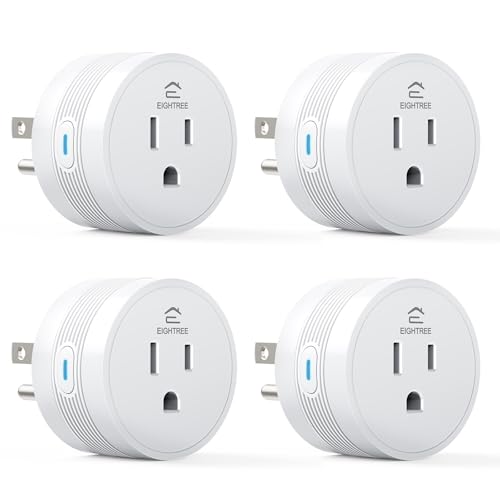
EIGHTREE 15A Smart Plug, Wi-Fi & Bluetooth Smart Outlet for High-Power Home
15A high-power rating — handles ACs, heaters, and coffee makers
View Today's Price
Kasa Smart Plug HS103P2, Smart Home Wi-Fi Outlet Works with Alexa, Echo, Google
Trusted Kasa smart plug with millions of users
View Today's Price
Smart Plug by Wyze Lifestyle, 2.4GHz Smart Home Wi-Fi Plug Outlet Compatible
Certified for Humans — simple, fuss-free setup
View Today's PriceHow to Choose the Right Smart Plugs
Choosing the right smart plug depends on platform compatibility, feature priorities, outlet location, and budget—trade-offs that shift based on your home’s ecosystem and automation goals. A feature that’s perfect for Alexa users might be useless for Apple HomeKit fans, and outdoor needs change the equation entirely. Our recommendation engine evaluates your specific setup across five key dimensions and matches you to the ideal smart plug in under 60 seconds.
About this guide
Smart Plugs
The Real Buying Challenge: Navigating Specs, Price, and Ecosystem Traps
Choosing the right smart plugs in 2026 is trickier than it looks. Platform compatibility is make-or-break: a smart plug that works flawlessly with Alexa may not play nice with Apple HomeKit unless it’s Matter-certified. Many buyers overlook this and end up with smart plugs that don’t integrate with their preferred voice assistant or automation routines. Price tiers are real—budget smart plugs start at $7–8 per plug, but you’ll sacrifice features like advanced energy monitoring or Thread support, which show up in $35–40 premium smart plugs. Energy monitoring is now standard even on budget smart plugs, but accuracy varies: only top smart plugs hit within 2–5% of a pro meter. Compact design matters more than most realize—some mini smart plugs let you use both wall outlets, while bulkier smart plugs block the second socket entirely. Outdoor use adds another layer: you need IP64 or higher for year-round reliability, but many buyers mistakenly use indoor smart plugs outside, risking failure. Most shoppers underestimate the importance of safety marks (UL, ETL, FCC), and end up with uncertified smart plugs. Don’t just grab the cheapest 4-pack of smart plugs—trade-offs between price, compatibility, and safety are real.
What Separates the Options: Technologies, Brands, and Real-World Performance
The biggest differentiators in smart plugs today are Matter certification, energy monitoring accuracy, and build quality. Matter-certified smart plugs—like those from Eve Energy and Meross—are worth the premium if you want seamless control across Alexa, Google Home, Apple HomeKit, and SmartThings. Skip non-Matter smart plugs unless you’re 100% locked into one platform. TP-Link Kasa and Tapo dominate the value segment, offering reliable Wi-Fi smart plugs with broad compatibility, but you’ll need to check if energy monitoring is included on each smart plug model. Wyze and Govee offer aggressively priced multi-packs of smart plugs, but their energy monitoring can lag in accuracy or app polish. Outdoor-rated smart plugs from Meross and Kasa feature IP64/IP65 weatherproofing and dual outlets—don’t use indoor-only smart plugs outside, no matter how tempting the price. Thread support is still niche but makes a real difference in responsiveness for Apple HomeKit users who rely on smart plugs. Skip dual-outlet smart plugs unless you have a real need; they’re bulkier and rarely fit tight spaces. Safety certifications aren’t optional—always check for UL, ETL, or FCC marks, especially on lesser-known smart plug brands. In short: prioritize Matter and monitoring if you want future-proof smart plugs, and don’t chase features you’ll never use.
Decision Factors and How to Choose: Interactions That Change the Game
Smart plug selection isn’t just about ticking boxes—it’s about how your needs interact with smart plugs in your home. Room placement matters: outdoor use demands IP64+ weatherproofing, which limits your smart plug options and bumps the price. If you want energy monitoring, expect to pay closer to $25 per smart plug unless you’re willing to accept less accurate readings. Budget constraints force trade-offs: under $15 gets you basic on/off and scheduling smart plugs, but rarely Matter or Thread. If you want to automate your whole home, multi-packs of smart plugs from TP-Link or Wyze offer the best per-plug value, but may lack advanced features. The quiz evaluates your platform, feature priorities, use location, budget, and outlet count to match you to the right smart plugs. Beyond that, think about how many devices you’ll automate, whether you need voice control for every smart plug, and if you’ll actually use energy tracking data from your smart plugs. Don’t forget: safety and reliability trump flashy features—UL or ETL marks are non-negotiable for smart plugs, especially for high-draw appliances. If you’re renting or planning to move, compact, Wi-Fi-only smart plugs are easier to relocate and reset than hardwired or hub-based smart plugs. Match your smart plug not just to your wishlist, but to your real-life habits and setup.
Buyer's guide
How to choose
1Core Performance Criteria
- Ensure the smart plug is Matter-certified if you want seamless integration with Alexa, Google Home, Apple HomeKit, and SmartThings in 2026.
- Look for energy monitoring accuracy within 2–5% of a professional meter, which is now achievable on top models from Kasa and Eve Energy.
- Choose a compact design if you need to keep the second wall outlet free—mini plugs from Tapo and Wyze excel at this.
- Outdoor plugs require an IP64 or higher weather rating for true year-round use; avoid using indoor models outside to prevent failure.
- Check for reliable Wi-Fi or Thread connectivity; Thread support is especially valuable for Apple HomeKit users seeking low-latency control.
- Verify the plug’s maximum amperage rating—15A is standard for most indoor models, but outdoor and heavy-duty plugs may support more.
2Build Quality and Durability
- Prioritize UL, ETL, or FCC certifications to ensure the plug meets safety standards and can handle daily use without overheating.
- Outdoor models from Meross and Kasa feature rugged casings and weather-sealed outlets, critical for patios, gardens, or holiday lighting setups.
- Avoid generic imports lacking safety marks, as these often fail under load and pose a real fire risk, especially on high-wattage appliances.
- Check for solid, wobble-free prongs and a snug fit in the outlet—loose plugs can arc and wear out faster than you’d expect.
- Threaded or gasketed covers on outdoor plugs add real-world durability against rain, dust, and insects, extending lifespan even in harsh climates.
- Look for plugs with reinforced housings if you plan frequent plugging/unplugging or use in high-traffic areas like kitchens or garages.
3Value Analysis
- Budget plugs start around $7–8 each in multi-packs from Wyze or TP-Link, but may lack advanced energy monitoring or Matter support.
- Mid-range models ($20–$25) typically add accurate energy monitoring and better app support, making them a sweet spot for most buyers.
- Premium plugs ($35–$40) offer Matter, Thread, and top-tier energy analytics—worth it only if you want future-proof compatibility and detailed tracking.
- Multi-packs deliver the best per-plug value for whole-home setups, but check if every plug in the pack supports your must-have features.
- Don’t overpay for dual-outlet or outdoor models unless you truly need both sockets or weatherproofing; they’re bulkier and cost more.
- Factor in long-term electricity savings from energy monitoring—identifying and cutting vampire loads can offset the higher up-front cost over time.
4Use-Case Fit
- If you’re automating lamps or coffee makers, basic on/off scheduling is all you need—don’t pay extra for features you’ll never use.
- Outdoor holiday lighting or garden pumps require IP64+ plugs; Meross and Kasa outdoor models are purpose-built for this and resist rain or snow.
- Apple HomeKit users should prioritize Matter or Thread support, as it ensures fast, reliable control and avoids future compatibility headaches.
- For renters or frequent movers, compact Wi-Fi-only plugs are easier to relocate and reset than hub-based or hardwired alternatives.
- Multi-packs are ideal for whole-home automation, but make sure every plug fits your outlet layout—some block the second socket.
- Heavy-duty appliances like space heaters need plugs rated for 15A or higher—never use a basic indoor plug for high-wattage loads.
5Common Mistakes
- Many buyers forget to check platform compatibility and end up with plugs that won’t work with their Alexa, Google, or Apple setup.
- Using indoor-only plugs outside is a recipe for failure—moisture will eventually cause shorts or permanent damage, even under a covered patio.
- Overlooking safety certifications is risky; uncertified imports can overheat, fail early, or even cause electrical fires in worst-case scenarios.
- Assuming all plugs in a multi-pack have the same features is a mistake—some bundles mix basic and advanced models to cut costs.
- Ignoring plug size leads to blocked outlets; always check dimensions if you need to use both sockets in a wall plate.
- Paying a premium for energy monitoring without actually using the data wastes money—make sure you’ll benefit from this feature before upgrading.
6Maintenance and Longevity
- Regularly check for firmware updates in the app to patch security vulnerabilities and ensure compatibility with evolving smart home platforms.
- Inspect plugs periodically for signs of heat discoloration or loose prongs, especially on high-draw devices or outdoor installations.
- Clean outdoor plugs with a dry cloth and reseal gaskets after storms to prevent moisture ingress and prolong service life.
- Unplug and reset devices every few months to clear software glitches—some models benefit from a power cycle to maintain responsiveness.
- Store unused plugs in a dry, dust-free location; moisture or dirt in the contacts can cause issues when reused later.
- Don’t exceed the rated amperage or use extension cords with high-wattage appliances—this shortens plug lifespan and voids most warranties.
FAQ
Frequently asked questions
Is Matter certification really worth paying extra for in 2026?
Matter-certified smart plugs are absolutely worth the premium if you want seamless integration across Alexa, Google Home, Apple HomeKit, and SmartThings. Matter eliminates the headaches of platform lock-in, letting you control devices from any major app or voice assistant. If you plan to upgrade your smart home or switch ecosystems, Matter ensures your plugs won’t become obsolete. For buyers who only use one platform and don’t care about future-proofing, it’s less essential—but for most, the flexibility and reliability Matter brings justifies the higher price.
How does TP-Link Kasa compare to Wyze for smart plugs?
TP-Link Kasa plugs are known for rock-solid reliability, broad compatibility, and excellent app support, making them a favorite for both beginners and power users. Wyze plugs are more aggressively priced, especially in multi-packs, and offer decent performance for basic automation. However, Kasa models generally have better energy monitoring accuracy and a more polished user experience. If you want advanced features or long-term durability, Kasa is worth the extra cost. Wyze is a great value if you just need simple on/off control in several rooms.
What energy monitoring accuracy should I expect from smart plugs?
The best smart plugs in 2026, such as those from Kasa and Eve Energy, deliver energy monitoring accuracy within 2–5% of a professional meter. Budget models may claim energy tracking but often drift by 10% or more, making them unreliable for serious savings calculations. If you want to identify vampire devices and optimize your electricity bill, invest in a plug with verified accuracy. Always check expert reviews or manufacturer specs—don’t trust vague claims about energy monitoring without hard numbers.
Are outdoor smart plugs safe to use year-round?
Outdoor smart plugs are safe for year-round use only if they have an IP64 or higher weather rating and proper safety certifications like UL or ETL. Models from Meross and Kasa are specifically designed for patios, gardens, and holiday lighting, with rugged housings and sealed outlets. Never use an indoor-only plug outside—even under a covered porch—as moisture and temperature swings will eventually cause failures. Always double-check the weather rating and safety marks before installing any plug outdoors.
Do I need Thread support, or is Wi-Fi enough for most homes?
Thread support is most valuable for Apple HomeKit users or anyone building a robust, low-latency smart home network. Thread plugs respond faster, create mesh networks for better reliability, and reduce Wi-Fi congestion. For most users with basic automation needs, Wi-Fi-only plugs from Kasa, Tapo, or Wyze are perfectly sufficient and easier to set up. If you want future-proofing or already have Thread-enabled hubs, it’s worth seeking out Thread plugs—otherwise, Wi-Fi remains the mainstream choice in 2026.
What’s the best value: single plugs or multi-packs?
Multi-packs from brands like TP-Link and Wyze offer the best per-plug value, often dropping the price to $7–8 each. However, not all plugs in a pack may include advanced features like energy monitoring or Matter, so read the details carefully. Single plugs are better if you only need one or two and want premium features, but expect to pay more per unit. For whole-home automation, multi-packs are the way to go—just confirm every plug matches your requirements.
How does the Amazon Smart Plug stack up against other brands?
The Amazon Smart Plug is praised for its effortless setup and strong data security, especially if you’re deep in the Alexa ecosystem. It’s extremely user-friendly and integrates tightly with Alexa routines. However, it lacks energy monitoring and doesn’t support Google Home or Apple HomeKit, limiting its flexibility. For Alexa-only households, it’s a solid pick. If you want cross-platform support or advanced features like Matter or energy tracking, TP-Link Kasa, Meross, or Eve Energy offer more versatility and better long-term value.
Best Smart Plugs By Category
Related Guides
Automatic Pet Feeders
Matched to your pet’s food type, number of pets, feeding schedule, and the features you’ll actually use.
Upgrade Your Home Security with DIY Smart Products
We match you to the right cameras, locks, doorbells, and Wi-Fi—based on your home, tech comfort, budget, and security priorities.
Top Products to Make Your Home More Energy Efficient
Matches you to smart thermostats, ACs, and appliances based on your climate, home type, budget, and comfort with tech.
Home Security Cameras
Mounting, power, resolution, storage, and smart features—get a security camera matched to your home, habits, and privacy needs.
Home Weather Stations
Matched to your climate, installation site, data needs, and how serious you are about weather tracking.