Find Your Perfect Beginner Sit Stand Desk Converter
We scored 250+ sit-stand desk converters across 5 dimensions — answer 5 quick questions and we'll match you to YOUR best pick.

Powered by DecisionScore™
Each product is evaluated across 18 weighted criteria — covering performance, value, build quality, and real-world usability. Your quiz answers re-weight the criteria to match what matters most to you, so two people can get different #1 picks from the same data.
See the DecisionScore methodology →- Gas‑spring mechanism provides smooth vertical lift
- Compact design fits on narrow desks
- Wide keyboard tray for comfortable typing
Find your perfect sit-stand desk converters
5 quick questions. No quiz-takes-10-minutes trap. A personalized match from 25 scored picks — with clear reasoning for every recommendation.
What will you primarily place on the converter?
Your answer helps size the surface and weight capacity. A laptop needs less space than dual monitors. If unsure, choose single monitor & keyboard.
- Add up the weight of all devices you plan to use, including monitors, laptops, and accessories.
- Dual monitors require a wider surface and higher weight capacity than a single laptop.
- If you use a docking station or speakers, factor those into your workspace needs.
As an Amazon Associate and affiliate partner we earn from qualifying purchases. Links on this page may earn us a commission at no extra cost to you. Full disclosure
Not ready for the quiz? Here are our overall top picks
These are our top-rated picks overall. For a recommendation matched to YOUR specific needs,
FLEXISPOT Standing Desk Converter 28" Wide Height Adjustable Sit Stand Riser,
Gas‑spring mechanism provides smooth vertical lift
View Today's Price
FITUEYES Height Adjustable Standing Desk 32” Wide Sit to Stand Converter Stand
Compact riser that sits or clamps on desk
View Today's Price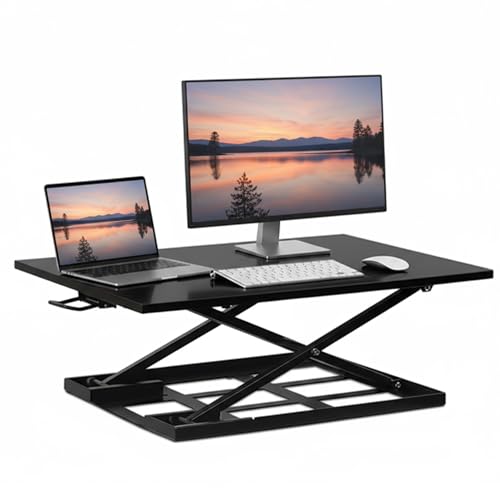
Mount-It! Standing Desk Converter 32" x 22" – Sit Stand Desk Riser with Gas
Single large surface ideal for laptop or monitor setups
View Today's PriceHow to Choose the Right Sit-Stand Desk Converters
Choosing the right sit-stand desk converter depends on your equipment load, desk size, adjustment preferences, and ergonomic needs—trade-offs that shift based on your workspace and workflow. A converter that’s perfect for a dual-monitor setup could be unstable or oversized for a compact desk. That’s why generic top-10 lists miss the mark: what works for one user can be a disaster for another. Our recommendation engine evaluates your unique situation across 12 dimensions and matches you to the best-fit converter in under 60 seconds.
About this guide
Sit-Stand Desk Converters
Why Sit-Stand Converter Choices Are Surprisingly Complex
Beginner sit stand desk converters may look simple, but choosing the right one is a minefield of trade-offs. The mechanism—manual, gas-spring, or electric—directly affects ease of use and price for beginner sit stand desk converters. Gas-spring models like the VariDesk Pro Plus 36 ($400–$450) glide up and down but can wobble at full height, especially with heavier setups, which is a key consideration for those new to beginner sit stand desk converters. Electric lifts such as the Ergotron WorkFit-A ($500–$600) offer push-button convenience and stability, but cost more and add weight, making them a premium choice among beginner sit stand desk converters. Surface size and weight capacity are make-or-break: a single laptop needs less space and support than dual 27-inch monitors, which require at least a 28–35 lb capacity and a 36-inch wide surface on beginner sit stand desk converters. Most buyers underestimate the desk depth required—24 inches is the bare minimum for avoiding knee pinch, yet 80% of returns for beginner sit stand desk converters stem from this oversight. Budget models under $300 often skimp on stability, finish, and warranty, while premium beginner sit stand desk converters add features like memory presets and integrated charging. It’s easy to get lured by slick marketing, but a $200 beginner sit stand desk converter that sags or pinches your knees is a regret waiting to happen.
What Actually Sets Top Converters Apart
Not all beginner sit stand desk converters are created equal, and the differences go far beyond price tags. The best beginner sit stand desk converters—like Ergotron’s WorkFit series and the VariDesk Pro Plus 36—stand out for their smooth, stable lift mechanisms and robust build quality. Gas-spring lifts are fast and quiet but can bind under heavy loads, so skip these beginner sit stand desk converters if your setup exceeds 20 lbs; electric models excel for heavier dual-monitor rigs. Two-tier beginner sit stand desk converters with separate keyboard trays, such as the HealthPostures TaskMate Executive 6100, deliver true ergonomic positioning but add bulk and weight. Arm-style beginner sit stand desk converters clamp to your desk and offer infinite adjustability, but require sturdy surfaces and careful installation. Don’t be fooled by high weight ratings—dynamic use drops capacity by 20% on most beginner sit stand desk converters. Skip integrated trays if you use a large mechanical keyboard; opt for a single-surface beginner sit stand desk converter instead. Features like cable management, VESA monitor mounts, and memory presets are worth paying for if you change positions often, but minimalist users can safely ignore them on beginner sit stand desk converters. In 2026, brands like Ergotron, VariDesk, and Innovative dominate the beginner sit stand desk converters market for reliability, while value picks like Rocelco trade extras for simplicity.
How to Choose: Key Factors and Interactions
Your desk size, equipment weight, and adjustment preferences all interact to shape the right beginner sit stand desk converters for you. A compact workspace demands beginner sit stand desk converters with a small footprint, but that often means sacrificing dual-monitor support and keyboard tray ergonomics. If you need portability—say, for hot-desking or stowing away—look for lightweight, foldable beginner sit stand desk converters, but be ready to compromise on stability and lift range. Heavy-duty beginner sit stand desk converters excel with multiple monitors but require at least 24–30 inches of desk depth and a sturdy surface to avoid wobble. The lift mechanism matters more if you plan to switch positions several times a day; gas-spring beginner sit stand desk converters are quick, but electric lifts are better for heavier setups and frequent use. Our quiz evaluates your workspace, device load, ergonomic needs, and desired features to pinpoint the right beginner sit stand desk converters for your situation. Always measure your desk depth and check clamp compatibility before buying beginner sit stand desk converters—those two factors alone eliminate half of unsuitable options. Think through your real workflow and don’t just chase the most features; the best beginner sit stand desk converters are the ones that fit your habits, space, and equipment.
Buyer's guide
How to choose
1Core Performance Criteria: Stability, Lift, and Capacity
- Always match the converter’s weight capacity to your actual setup—dual monitors and accessories can easily exceed 25 lbs, stressing budget models.
- Gas-spring and electric lifts are smoother and safer for daily use than manual levers, especially if you raise and lower your desk multiple times a day.
- Look for a height range of at least 5–18 inches to accommodate users from 5'4" to 6'2" standing comfortably without hunching.
- Check for wobble at full extension—models like the Ergotron WorkFit-A score 9/10 for stability, while cheaper units can sway 1–2 inches when typing.
- A two-tier design with a separate keyboard tray improves ergonomic alignment but may limit available workspace for larger keyboards and mice.
- Verify the converter’s surface width and depth; 36-inch models like the VariDesk Pro Plus 36 fit dual monitors without overhang, while smaller units suit laptops only.
2Build Quality and Durability
- Premium brands like Ergotron and VariDesk offer 5–10 year warranties, reflecting higher-quality materials and better long-term durability than value models.
- Sturdy steel frames and reinforced joints reduce flex and creaking, which is critical if you’re typing vigorously or using heavy monitors.
- Electric lift models tend to last longer under heavy use, but require reliable motors and protected wiring to avoid breakdowns after two years.
- Clamp-mount and arm-style converters must fit securely to desks under 2.5 inches thick; ill-fitting clamps are a leading cause of instability and returns.
- Surface finish matters—matte or textured surfaces prevent keyboard and mouse slippage, a common complaint with glossy or plastic trays.
- Budget models under $300 often sacrifice build quality, leading to more wobble, squeaks, and surface wear after a year of daily use.
3Value Analysis: What You Get at Each Price Point
- The $300–$450 range is the current sweet spot, balancing smooth lift, 25+ lb capacity, and 5-year warranties from trusted brands like Ergotron and Innovative.
- Units under $250 may seem appealing, but often lack stability, have limited height adjustment, and use cheaper plastics that wear quickly.
- Spending over $500 generally adds electric lift, memory presets, and premium finishes, but most users won’t need these extras for single-monitor setups.
- Check for included features—cable management, monitor mounts, and charging ports can add $50–$100 in value if you need them.
- Warranty length is a strong value indicator; five years or more signals a manufacturer’s confidence in durability and support.
- Don’t pay extra for features you’ll never use—if you never move your setup, skip electric lifts and opt for a solid pneumatic model.
4Use-Case Fit: Matching Converter to Workspace and Workflow
- Measure your desk depth—at least 24 inches is needed for most converters, especially two-tier models that extend toward you when raised.
- If you hot-desk or need portability, choose a lightweight, foldable converter, but be prepared for a smaller work surface and lower weight capacity.
- Dual-monitor setups require a converter with at least 36-inch width and 28–35 lb capacity, like the VariDesk Pro Plus 36 or Ergotron WorkFit-A.
- For occasional standing, a simple riser or arm-style converter is sufficient, but daily users benefit from smoother lifts and ergonomic trays.
- Shallow desks (under 24 inches) limit your options—look for compact or clamp-mount models, and avoid two-tier designs that eat up legroom.
- If you need to stow the converter away, prioritize models under 25 lbs with handles or folding mechanisms for easy movement.
5Common Mistakes and How to Avoid Them
- Failing to measure desk depth leads to knee clearance issues—80% of returns are due to converters not fitting shallow desks properly.
- Ignoring weight capacity results in sagging or wobble—always total your monitor, laptop, and accessory weights before choosing a model.
- Assuming all converters fit any desk is a mistake—clamp compatibility and desk thickness (max 2.5 inches) are critical for safe installation.
- Overestimating the need for features like memory presets or charging ports can inflate costs without improving daily use for most buyers.
- Not checking keyboard tray size can cause ergonomic problems—large keyboards or mice may not fit on some two-tier trays.
- Skipping warranty and support research often leads to frustration if parts break or adjustments fail after a year of use.
6Maintenance and Longevity
- Wipe surfaces regularly to prevent dust and debris from jamming lift mechanisms, especially on gas-spring and electric models.
- Check and tighten all screws and clamps every few months—loose hardware is a leading cause of wobble and instability.
- Electric lifts should be plugged into surge-protected outlets to avoid motor burnout or electrical damage over time.
- Lubricate moving parts annually with silicone spray to maintain smooth height adjustment and prevent squeaking or binding.
- Inspect trays and platforms for cracks or warping, especially if you regularly exceed the stated weight capacity.
- Register your converter with the manufacturer for warranty coverage—brands like Ergotron and VariDesk offer responsive support for replacement parts.
FAQ
Frequently asked questions
Is it worth paying extra for an electric lift on a sit-stand desk converter?
Electric lifts are worth the premium if you frequently switch between sitting and standing or have a heavy dual-monitor setup. Models like the Ergotron WorkFit-A offer push-button adjustment, smooth transitions, and better stability at full height. However, if you only plan to change positions once or twice a day and your setup is under 20 lbs, a quality gas-spring model provides excellent value without the added cost and weight of an electric motor.
How does Ergotron compare to VariDesk for durability and ergonomics?
Ergotron converters, such as the WorkFit-S and WorkFit-A, consistently score higher in long-term durability and stability tests, with 5–10 year warranties and robust steel frames. VariDesk models like the Pro Plus 36 excel in smooth lift mechanisms and ergonomic two-tier designs, making them ideal for users who prioritize comfort and frequent height changes. Both brands are top picks for 2026, but Ergotron edges out for heavy-duty use and warranty support.
What weight capacity do I need for dual monitors and accessories?
For a dual-monitor setup with accessories, choose a converter with at least a 28–35 lb weight capacity. The VariDesk Pro Plus 36 supports up to 35 lbs, while the Ergotron WorkFit-A is rated for 25 lbs but scores high for stability. Always total the weight of your monitors, keyboard, and any extras, and remember that dynamic movement can reduce effective capacity by 20% compared to static ratings.
Are budget converters under $300 reliable for daily use?
Budget converters under $300 can work for light, occasional use—especially single laptops or tablets—but often suffer from wobble, limited height range, and cheaper materials. Reviews from RTINGS and Wirecutter note that these models may develop squeaks or surface wear within a year. For daily use or heavier setups, it’s worth investing in a mid-range model from Innovative, Ergotron, or VariDesk for better longevity and support.
Do I really need a separate keyboard tray for ergonomics?
A separate keyboard tray is essential if you want optimal ergonomic alignment, especially for prolonged typing sessions. Two-tier designs allow your keyboard and mouse to sit at a lower, more natural height, reducing wrist strain. However, they add weight and can limit space for larger peripherals. If you use a compact keyboard or prefer a minimalist setup, a single-surface converter is a practical alternative.
How do I know if a converter will fit my desk?
Measure your desk depth—most two-tier converters require at least 24 inches, while arm-style and compact models can fit shallower desks. Check clamp compatibility if you’re considering a mount; most clamps fit desks up to 2.5 inches thick. Always compare your workspace dimensions to the product’s footprint and extension range to avoid knee clearance issues and ensure a stable fit.
What brands offer the best warranty and support in 2026?
Ergotron and VariDesk lead the pack in 2026, offering 5–10 year warranties and responsive customer support. Innovative and HealthPostures also provide multi-year coverage on their converters. Register your product after purchase to access replacement parts and technical assistance, which can be invaluable if you encounter lift mechanism issues or need hardware replacements down the line.
Related reading
Best Sit-Stand Desk Converters By Category
Related Guides
3D Printers
Matched to your print size, detail needs, materials, and how much you want to tinker or automate.
All-in-One Laser Printers for Home Office
Matched to your print volume, color needs, workflow features, and budget—get the right laser all-in-one for your home office.
Budget and Mid‑Range Laptops
Matched to your main tasks, OS preference, portability, and display—find a laptop that fits your real workflow and budget.
Color Laser Printers
Matched to your print volume, connectivity, and cost priorities—find the color laser printer that fits your workflow and space.