Skip the research trap. Get your wireless chargers in 60 seconds.
We scored 350+ wireless chargers across 5 dimensions — answer 5 quick questions and we'll match you to YOUR best pick.
Powered by DecisionScore™
Each product is evaluated across 18 weighted criteria — covering performance, value, build quality, and real-world usability. Your quiz answers re-weight the criteria to match what matters most to you, so two people can get different #1 picks from the same data.
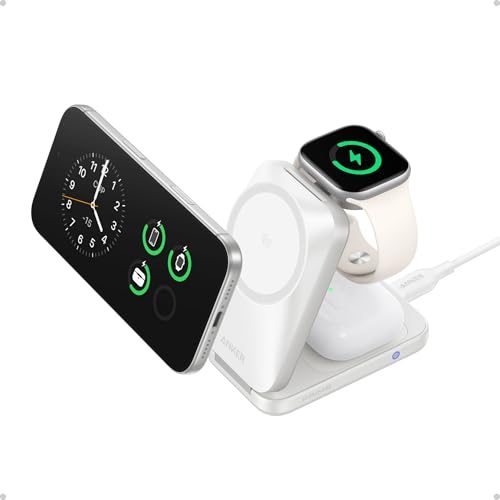
See the DecisionScore methodology →- Qi2 25W certified — fastest wireless charging for iPhone 16/17
- 3-in-1: charges iPhone + Apple Watch + AirPods simultaneously
- AirCool fan prevents overheating during fast charging
Find your perfect wireless chargers
5 quick questions. No quiz-takes-10-minutes trap. A personalized match from 32 scored picks — with clear reasoning for every recommendation.
What is your preferred charging power?
Charging power determines how quickly your device will charge. Higher wattage chargers can charge devices faster, but it's important to ensure your device supports the higher wattage to avoid potential damage.
- iPhone 12 or newer? Only Qi2/MagSafe chargers deliver true fast wireless charging—older iPhones max out at 7.5 W on standard Qi pads.
- Android users should look for 10–15 W Qi-certified pads, especially if you own a Samsung or Pixel device for optimal charging speeds.
- Mixed households should choose universal Qi pads or multi-device stations to ensure compatibility with both iPhone and Android devices.
As an Amazon Associate and affiliate partner we earn from qualifying purchases. Links on this page may earn us a commission at no extra cost to you. Full disclosure
Not ready for the quiz? Here are our overall top picks
These are our top-rated picks overall. For a recommendation matched to YOUR specific needs,
Anker Prime
Qi2 25W certified — fastest wireless charging for iPhone 16/17
View Today's Price
Belkin Wireless Charging Pad 15W - Qi Charger - Wireless Charger iPhone 17,
15W universal Qi charging — iPhone, Samsung Galaxy, Google Pixel
View Today's Price
MagSafe 25W Wireless Charger for Apple Magnetic Fast Charging Pad
Qi2 certified — 15W magnetic fast charging for iPhone
View Today's PriceHow to Choose the Right Wireless Chargers
Choosing the right wireless charger depends on your phone ecosystem, charging speed needs, device count, and where you’ll use it—factors that interact in surprising ways. A charger that’s perfect for an iPhone 15 Pro on a nightstand is wrong for a Samsung user in the car. Generic top-10 lists can’t account for these nuanced trade-offs. Our recommendation engine analyzes your specific setup across five dimensions and matches you to the right wireless charger in under 60 seconds.
About this guide
Wireless Chargers
Why Wireless Charger Shopping Is Trickier Than It Looks
Buying wireless chargers in 2026 is more complicated than most people expect. The first trap: assuming any Qi wireless charger will work equally well for every phone. In reality, standard Qi wireless chargers deliver 5–10 W and are universal, but if you have an iPhone 12 or newer, only Qi2 or MagSafe-certified wireless chargers give you the 15–25 W speeds Apple promises. Android users, especially Samsung or Pixel owners, need 10–15 W wireless chargers for true fast charging—settling for a generic 5 W wireless charger means painfully slow top-ups. Price tiers matter: $10–$20 gets you a single-device wireless charger, but $30–$50 unlocks multi-device wireless chargers or MagSafe-certified models. Many buyers overlook USB-C input (for faster, future-proof power delivery), or buy wireless chargers that won’t work through their case—case compatibility up to 5 mm is a must. The biggest mistake? Ignoring the difference between a $12 no-name wireless charger and a $35 Anker, ESR, or Belkin: the latter offer better temperature protection, smarter LEDs, and real reliability. Don’t assume all wireless chargers are created equal.
What Actually Sets Wireless Chargers Apart in 2026
The real differentiators in wireless chargers today aren’t just about wattage. Qi2 and MagSafe certification are significant upgrades for iPhone users—skip any wireless chargers without these if you want true 15–25 W speeds and safe, reliable charging. For Android, Samsung-tuned wireless chargers (like those from Anker or Yootech) consistently outperform generic Qi wireless chargers, especially for the Galaxy S and Pixel lines. Multi-device wireless chargers from ESR or Belkin let you power your phone, earbuds, and smartwatch from one outlet—ideal for nightstands, but skip these wireless chargers if you only need to charge a single device. Features like sleep-friendly LEDs that auto-dim, case-friendly charging through 5 mm cases, and USB-C inputs matter more than most people realize when choosing wireless chargers. Don’t be fooled by flashy designs or bundled cables; focus on real specs and certifications when shopping for wireless chargers. Brands like Anker, INIU, TOZO, Yootech, NANAMI, ESR, Belkin, and Mophie dominate the $10–$50 range for a reason: these wireless chargers deliver consistent performance, safety, and compatibility. Prioritize magnetic alignment (Qi2/MagSafe) if you want hassle-free, snap-to-charge convenience from your wireless chargers.
How to Choose: Balancing Specs, Use Case, and Budget
Selecting the right wireless chargers means weighing your phone ecosystem, charging speed needs, device count, and where you’ll use them. If you’re an iPhone user, MagSafe or Qi2 wireless chargers are non-negotiable for fast, reliable charging—Android users should target 10–15 W Qi-certified wireless chargers, especially if you use Samsung or Pixel. Want to charge a phone, earbuds, and watch at once? Only look at dual- or triple-device wireless chargers, but be ready to pay closer to $40–$50 for solid performance. Desk or nightstand? Upright wireless charger stands and sleep-friendly LEDs matter. Travel or car use? Portable wireless chargers and sturdy mounts trump everything else. Our quiz evaluates your ecosystem, form factor, device count, speed, and usage location to match you to the right wireless chargers. Remember: room for error is slim—buying wireless chargers that are too slow, incompatible with your case, or lacking temperature protection leads to daily frustration. Always check for USB-C input, case compatibility (at least 5 mm), and real-world user ratings (4.0+ stars, 100+ reviews) before you buy wireless chargers.
Buyer's guide
How to choose
1Core Performance Criteria
- Look for Qi2 or MagSafe certification if you want the fastest 15–25 W charging on iPhones 12 and newer, or select Androids with Qi2.2 support.
- Android users should prioritize pads that deliver at least 10–15 W, such as those tuned for Samsung or Pixel, to avoid sluggish charging speeds.
- Case compatibility is crucial—ensure your charger works through at least 5 mm of rubber, plastic, or TPU, or you’ll be forced to remove your case daily.
- USB-C input is now standard on quality models from Anker, ESR, and Yootech, offering better power delivery and future-proofing than outdated micro-USB.
- A sleep-friendly LED indicator that dims or shuts off is essential for nightstand use, preventing annoying light pollution in your bedroom.
- Temperature and overcharge protection are not just marketing—brands like Anker and Belkin use advanced safety chips to prevent overheating and battery damage.
2Build Quality and Durability
- Anker, ESR, and Belkin consistently deliver robust build quality, with reinforced USB-C ports and non-slip rubber pads that hold up to years of daily use.
- Avoid ultra-cheap $10 pads from unknown brands—plastic flex, weak magnets, and poor soldering often lead to early failure or unreliable charging.
- Look for certifications like FCC, CE, and RoHS, which indicate real safety testing and compliance with international electrical standards.
- A solid base and weighted design prevent accidental knocks, especially for upright stands or multi-device stations used on busy desks.
- Premium models in the $40–$50 range often include braided cables and reinforced connectors, which last significantly longer than generic bundled cords.
- Check user reviews for reports of coil whine, overheating, or LED failures—these are red flags for long-term reliability even from otherwise reputable brands.
3Value Analysis and Price Tiers
- The $10–$20 tier is best for single-device pads from Yootech or TOZO, offering reliable 10 W charging but lacking multi-device support or MagSafe alignment.
- Stepping up to $25–$35 unlocks faster charging, Qi2/MagSafe compatibility, and better build quality from brands like Anker and ESR.
- Multi-device stations for $35–$50 can charge a phone, earbuds, and watch simultaneously, but only pay for this if you truly need it daily.
- Avoid paying extra for bundled wall adapters unless your current charger is underpowered—many pads now ship without adapters to reduce waste.
- Don’t be tempted by flashy RGB lighting or “premium” finishes unless they add real daily value—these features rarely justify a higher price.
- Products with at least 100 verified Amazon reviews and 4.0+ stars in this price range consistently outperform lesser-known competitors in user satisfaction.
4Use-Case Fit and Practicality
- Desk and nightstand chargers benefit from upright stands, letting you check notifications at a glance without picking up your phone.
- Flat pads are slimmer and more portable, making them ideal for travel or minimal setups where space is at a premium.
- Car wireless chargers require strong magnetic alignment and secure mounting—skip generic pads, as they can’t hold your phone steady on bumpy roads.
- Multi-device stations are perfect for Apple users with iPhone, AirPods, and Apple Watch, but are often overkill for single-device Android households.
- Foldable or compact designs from INIU and TOZO are best for frequent travelers, fitting easily in a bag without tangled cables.
- If you use a thick or metal case, double-check compatibility—some chargers won’t work through cases over 5 mm or with metal kickstands.
5Common Mistakes and Pitfalls
- Many buyers assume all Qi chargers are equally fast—using a 5 W pad with a modern phone leads to frustratingly slow charging times.
- Buying a charger that isn’t case-friendly means you’ll constantly remove your case, defeating the whole point of wireless convenience.
- Overlooking USB-C input results in slower charging and less reliable power delivery, especially as micro-USB becomes obsolete in 2026.
- Choosing a multi-device station when you only have one device wastes money and takes up unnecessary space on your desk or nightstand.
- Ignoring LED brightness can ruin your sleep—bright, non-dimmable indicators are a common complaint in user reviews for budget models.
- Failing to check for real safety certifications exposes you to overheating risks and potential device damage, especially with no-name brands.
6Maintenance and Longevity
- Keep charging pads and stands free of dust and debris, as buildup can interfere with coil alignment and reduce charging efficiency over time.
- Use only high-quality, certified cables and adapters—cheap accessories often cause slow charging or premature charger failure.
- Inspect USB-C ports regularly for wear or looseness; a wobbly connector is a leading cause of unreliable charging after a year or two.
- Avoid stacking objects on top of your charger, which can stress internal coils and shorten its lifespan, especially for slim travel pads.
- If your charger gets unusually warm or stops charging reliably, discontinue use and check for warranty coverage from brands like Anker or Belkin.
- Store travel chargers in a protective pouch to prevent scratches, bent pins, or cable damage while on the go.
FAQ
Frequently asked questions
Is MagSafe or Qi2 worth paying extra for if I have an iPhone?
Absolutely—if you own an iPhone 12 or newer, MagSafe or Qi2-certified chargers are the only way to get reliable 15–25 W wireless charging. Generic Qi pads max out at 7.5 W for iPhones, meaning much slower top-ups. MagSafe and Qi2 also provide magnetic alignment, so your phone snaps perfectly into place, reducing misalignment and charging interruptions. If you want fast, hassle-free charging and the best long-term compatibility, paying a little more for MagSafe or Qi2 is well worth it.
How does Anker compare to Belkin and ESR for wireless chargers?
Anker, Belkin, and ESR all deliver reliable wireless charging in the $20–$50 range, but there are subtle differences. Anker is known for robust build quality, sleep-friendly LEDs, and consistent performance across both pads and stands. Belkin’s MagSafe-certified models are Apple-approved and offer excellent safety features. ESR stands out for its affordable Qi2 multi-device stations and strong magnetic alignment. All three brands are trustworthy, but Anker is often the best all-rounder for both iPhone and Android users.
What wattage should I look for to get fast charging on my Samsung or Pixel?
For Samsung Galaxy and Google Pixel phones, look for wireless chargers that support at least 10 W output. Many Samsung-tuned pads and stands, such as those from Yootech or Anker, deliver 10–15 W for these devices. Avoid generic 5 W pads, as they will charge your phone much more slowly. Always check that the charger is Qi-certified and supports your phone’s fast wireless charging profile for optimal results.
Can I use a wireless charger with my phone case on?
Yes, as long as your case is under 5 mm thick and made of plastic, rubber, or TPU. Most quality chargers from brands like Anker, Yootech, and ESR are case-friendly up to 5 mm. However, metal cases, magnetic wallets, or thick rugged cases can block charging or reduce speed. Always check the product specs for case compatibility, and avoid using metal-backed cases or accessories with wireless charging pads.
Are multi-device charging stations worth it for most people?
Multi-device charging stations are ideal if you regularly charge a phone, earbuds, and a smartwatch—especially in Apple-centric households. However, they cost more ($35–$50) and take up more space. If you only need to charge a single phone, stick with a reliable pad or stand. Only invest in a 2-in-1 or 3-in-1 station if you’ll use all the charging spots daily; otherwise, it’s unnecessary bulk and expense.
What features should I look for in a wireless charger for travel?
For travel, prioritize slim, lightweight pads or foldable stations from brands like TOZO or INIU. USB-C input is a must for universal charging with modern adapters. Look for models with auto-dimming LEDs and robust build quality to survive being tossed in a bag. Avoid bulky stands or multi-device stations unless you truly need them on the go. A travel pouch or case-friendly design also helps prevent damage and frustration.
Do all wireless chargers come with a wall adapter included?
No, many wireless chargers—especially in the $10–$30 range—now ship without wall adapters to reduce electronic waste. This is common with Anker, Yootech, and ESR pads. If you don’t already have a USB-C power adapter that matches the charger’s wattage, you may need to buy one separately. Always check the product listing to see if an adapter is included, and use a high-quality adapter for the best charging speeds.
Related reading
Best Wireless Chargers By Category
Related Guides
Android Smartwatches
Battery life, health sensors, phone compatibility, and style—get matched to the Android smartwatch that fits your priorities, not just the specs.
Dog GPS Trackers & Smart Collars
Matches your dog’s size, roaming area, battery needs, and subscription comfort to the right tracker or smart collar.
Fitness Trackers and Smart Watches
Matched to your activity, comfort, battery needs, and whether you want smart features or pure fitness focus.
Sleep Trackers
Comfort, data detail, subscription fees, and phone compatibility—get matched to the right sleep tracker for your nightly routine.
Smartwatches
Phone compatibility, battery life, fitness tracking, and smart features—get matched to a smartwatch that truly fits your lifestyle.