Skip the research trap. Get your desk lamps in 60 seconds.
We scored 300+ desk lamps across 5 dimensions — answer 5 quick questions and we'll match you to YOUR best pick.
Powered by DecisionScore™
Each product is evaluated across 18 weighted criteria — covering performance, value, build quality, and real-world usability. Your quiz answers re-weight the criteria to match what matters most to you, so two people can get different #1 picks from the same data.
See the DecisionScore methodology →- 96 ultra-efficient SMD LEDs
- 3 light modes × 10 brightness levels
- Flicker-free, no glare, CE/RoHS/FCC certified
Find your perfect desk lamps
5 quick questions. No quiz-takes-10-minutes trap. A personalized match from 26 scored picks — with clear reasoning for every recommendation.
What type of lighting technology do you prefer?
The type of lighting technology affects energy efficiency, light quality, and longevity. LED lamps are generally more energy-efficient and have a longer lifespan compared to traditional bulbs.
- If you do a mix of tasks, pick the most demanding one—crafts and dual monitors require more light than reading.
- For computer work, look for lamps with glare reduction and mid-range color temperature (4000K–5000K).
- Crafters and artists should prioritize high CRI (≥90) and adjustable color temperature for true color accuracy.
As an Amazon Associate and affiliate partner we earn from qualifying purchases. Links on this page may earn us a commission at no extra cost to you. Full disclosure
Not ready for the quiz? Here are our overall top picks
These are our top-rated picks overall. For a recommendation matched to YOUR specific needs,
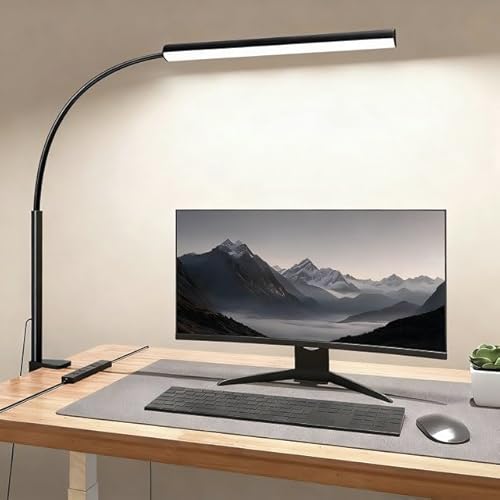
fuaoddda LED Desk Lamp with Clamp, Eye-Protection Clip on Desk Lamp, 5 Modes 10
96 ultra-efficient SMD LEDs
View Today's Price
ONEMIX 42" LED Desk Lamp for Home Office, Eye-Caring Desk Light with Adjustable
42-inch architect lamp with freestanding base
View Today's Price
ONEMIX 42" LED Desk Lamp with Clamp, Architect Desk Light with Remote,
42-inch architect bar, 4 adjustable segments
View Today's PriceHow to Choose the Right Desk Lamps
Choosing the right desk lamp depends on your workspace size, lighting preferences, device charging needs, and budget—factors that interact in surprising ways. A lamp that’s perfect for crafts may be overkill for simple reading, and the wrong mounting style can ruin your setup. Generic top-10 lists miss these nuances, recommending features that might not fit your real-world needs. Our recommendation engine analyzes your unique situation across five dimensions and matches you to the ideal desk lamp in under 60 seconds.
About this guide
Desk Lamps
Why Desk Lamp Shopping Is Trickier Than It Looks
Choosing the right desk lamp in 2026 is more complicated than grabbing the first LED desk lamp on Amazon. The real challenge is balancing specs like color temperature (2700K–6500K), CRI (≥85 for accurate colors), and brightness (500–1800 lumens) against your actual workspace needs. For example, a $30 desk lamp might offer basic illumination, but it usually skimps on adjustability, eye-care features, and color rendering. Step up to $50 and you’ll find desk lamps with USB charging ports, touch controls, and better build quality, but not always the flexible arms or ultra-wide coverage that architects and dual-monitor users crave. Premium desk lamps up to $150 deliver swing arms, clamp mounts, and 1800-lumen output, but those features are wasted if you just need a reading light. Most buyers underestimate how much mounting style and adjustability matter for comfort and productivity when choosing desk lamps. Many also assume any “LED” desk lamp is flicker-free or eye-safe, which isn’t true—budget desk lamps often lack proper circuitry. Getting the right fit means sorting through trade-offs in desk lamps that aren’t obvious at first glance.
What Actually Sets Desk Lamps Apart
The real differentiators among desk lamps in 2026 aren’t just about brightness or price—they’re about how well each desk lamp matches your workflow and space. Adjustable color temperature (2700K for cozy reading, 6500K for detail work) is a must for anyone working long hours under desk lamps. Skip desk lamps with fixed color output unless you never switch tasks. Touch controls and stepless dimming on desk lamps are more than gimmicks—they let you fine-tune light levels for eye comfort, especially if you’re staring at screens. Architect-style swing arms and clamp mounts, like those found on Neatfi XL or LEPOWER’s metal desk lamps, are significant upgrades for multi-monitor setups or small desks. Integrated USB-A, USB-C, and wireless charging in desk lamps are worth paying for if you’re constantly topping up devices, but they add cost and sometimes bulk. CRI above 85 is essential for color accuracy in desk lamps—don’t settle for less if you do art, crafts, or anything visual. Flicker-free circuitry and blue-light reduction in desk lamps matter more than most people realize; cheap desk lamps with low-quality LEDs can cause subtle eye fatigue over time. Skip “feature bloat” in desk lamps unless you truly need every bell and whistle.
How to Weigh Decision Factors for Your Space
Desk lamp selection in 2026 is all about matching the desk lamp’s strengths to your real-world setup. Room size and desk layout dictate whether you need wide-coverage architect desk lamps or compact gooseneck desk lamps. If your desk is cramped, a clamp-mount desk lamp frees up valuable space—don’t force a bulky base where it doesn’t fit. Your budget sets hard limits: under $30 means sacrificing advanced controls or charging in desk lamps, while $70+ unlocks premium adjustability and output. The type of work you do—reading, crafting, or multi-screen computing—directly impacts which desk lamp specs are non-negotiable. For example, high CRI and adjustable color temp are critical for crafts, but less so for basic reading desk lamps. Our quiz evaluates your primary use, budget, control preference, charging needs, and mounting style to pinpoint the best desk lamp match. The key is to avoid one-size-fits-all thinking: the perfect desk lamp for a student is all wrong for a designer. Always consider how desk lamp features interact—charging ports add convenience but may limit lamp positioning, while touch controls are great unless you work with gloves or messy hands.
Buyer's guide
How to choose
1Core Performance Criteria
- Aim for a color rendering index (CRI) of at least 85 to ensure accurate colors, especially for crafts, design, or any visual work.
- Choose lamps with adjustable color temperature (2700K–6500K) so you can switch between warm light for reading and cool light for focus.
- Stepless dimming is essential for eye comfort during long sessions—avoid models with only two or three brightness presets.
- A brightness range of 500–1800 lumens covers everything from ambient reading to detailed technical work at a dual-monitor setup.
- Flicker-free LED arrays and blue-light reduction features are crucial if you spend hours at your desk to minimize eye strain.
- Architect lamps with swing arms and wide heads, like the Neatfi XL, provide even coverage for large desks or multi-monitor workspaces.
2Build Quality and Durability
- Metal construction, as seen in LEPOWER and Neatfi models, offers better stability and longevity than plastic-bodied budget lamps.
- Check for reinforced joints and sturdy hinges on swing-arm lamps, since weak points often fail with frequent repositioning.
- Matte finishes resist fingerprints and scratches, maintaining a cleaner look in high-touch environments compared to glossy plastics.
- Premium models around $100–$150 often feature braided power cords and robust clamp mechanisms for added durability.
- Gooseneck lamps should hold their position without sagging; test for droop, especially in cheaper models under $30.
- Warranty length varies—look for at least a one-year warranty on mid-range and premium lamps for peace of mind.
3Value Analysis: What You Really Get
- Budget lamps under $30 usually lack advanced features like USB charging, stepless dimming, or high CRI, but can suffice for basic reading.
- Mid-range lamps ($50–$70) hit the sweet spot for most users, offering touch controls, USB-A charging, and better adjustability.
- Premium lamps ($100–$150) justify their price with architect arms, ultra-bright output, and multiple charging options—but only if you need them.
- Integrated USB-C and wireless charging add $10–$30 to the price, but are worth it if you charge devices daily at your desk.
- Don’t overpay for features you won’t use—remote controls and multi-mode color cycling are unnecessary for simple reading or bedside use.
- Editorial picks from Forbes and Tom’s Guide often highlight value leaders that balance build quality, adjustability, and eye-care features.
4Use-Case Fit: Matching Lamp to Task
- For home office and computer work, prioritize flicker-free LEDs, mid-range color temperature, and adjustable arms for glare-free positioning.
- Students and readers benefit from warm color modes (2700K–3200K) and simple touch or switch controls for quick adjustments.
- Crafters and designers should seek high CRI (≥90) and ultra-bright output to ensure true color accuracy and shadow-free illumination.
- Dual-monitor or architect setups demand wide-head lamps (20 inches or more) with swing arms and clamp mounts for full desk coverage.
- Bedside and ambient use calls for compact lamps with gentle dimming and base mounts—avoid clamp models unless space is extremely tight.
- Device charging is a must for tech-heavy users, but irrelevant if your desk already has a dedicated charging station.
5Common Mistakes and Buyer Pitfalls
- Assuming all LEDs are flicker-free—many budget lamps under $30 still cause subtle eye fatigue during long sessions.
- Overlooking mounting style—forcing a base lamp onto a cramped desk leads to frustration and wasted space.
- Ignoring CRI ratings—low CRI lamps distort colors, which is a dealbreaker for art, crafts, or video calls.
- Paying extra for wireless charging when you only use USB-A devices, or vice versa—match charging features to your actual tech.
- Choosing fixed color temperature models, then regretting the lack of flexibility for different tasks and moods.
- Buying on price alone—cheaper lamps often have weak hinges, poor stability, or short power cords that limit placement.
6Maintenance and Longevity
- LED lifespan is typically 30,000–50,000 hours, but only if the lamp has proper heat dissipation—metal housings help extend life.
- Dust and debris build up quickly on matte finishes and lamp heads; regular cleaning maintains brightness and prevents overheating.
- Clamp mechanisms should be checked periodically for loosening, especially on swing-arm models used daily.
- Integrated charging ports can fail before the lamp itself—choose models with replaceable or upgradable charging modules if possible.
- Avoid lamps with proprietary bulbs or non-replaceable LEDs unless you’re comfortable replacing the entire unit after several years.
- Keep receipts and register warranties, as mid-range and premium brands often honor repairs or replacements within the first year.
FAQ
Frequently asked questions
Is adjustable color temperature really worth paying extra for?
Absolutely—adjustable color temperature (2700K–6500K) lets you tailor the light for reading, computer work, or crafts. Warm light (2700K–3200K) is easier on your eyes at night, while cool daylight (5000K–6500K) boosts focus for detail tasks. Most users find fixed-color lamps too limiting over time. If you work at your desk for hours or switch between tasks, this feature is easily worth the extra $10–$20.
How does LEPOWER compare to Neatfi for home office use?
LEPOWER’s metal desk lamps are affordable, sturdy, and ideal for compact desks or reading, with basic adjustability and on/off switches. Neatfi, on the other hand, targets power users: the XL model offers 2200 lumens, a 20-inch wide head, four dimming levels, and an architect-style clamp—perfect for dual monitors or large workspaces. For home office setups needing broad, shadow-free coverage, Neatfi is the clear winner, but LEPOWER is a strong value for smaller spaces.
What brightness (lumens) do I need for reading vs. crafts?
For reading and studying, a desk lamp with 500–800 lumens is usually sufficient, providing enough light without glare. For crafts, design, or any detailed work, aim for 1200–1800 lumens to ensure even illumination and minimize shadows. Dual-monitor or architect setups may require up to 2200 lumens, as seen in the Neatfi XL. Always match brightness to your primary task for best results.
Are USB-C and wireless charging features reliable in desk lamps?
Most mid-range and premium desk lamps with USB-C or wireless charging are reliable, but quality varies. Look for brands with positive long-term reviews and at least a one-year warranty. Some cheaper models cut corners, resulting in slow charging or ports that fail after a few months. If you rely on fast device charging, stick to lamps from reputable brands and avoid no-name imports.
Do I need a clamp lamp or is a base lamp enough?
Clamp lamps are ideal if you have a small or crowded desk, need to reposition the lamp frequently, or want wide, adjustable coverage (especially for dual monitors). Base lamps offer more stability and portability, making them great for reading or bedside use. If you’re unsure, some models offer both mounting options. Always consider your desk layout and how much surface space you can spare.
What makes a desk lamp truly 'eye-caring'?
An 'eye-caring' desk lamp combines flicker-free LED circuitry, adjustable color temperature, and a high CRI (≥85). Flicker-free tech reduces invisible strobe effects that cause fatigue, while color adjustability prevents eye strain during long work sessions. High CRI ensures colors look natural, especially under artificial light. Avoid budget lamps that skip these features—they can cause headaches and reduce productivity over time.
Which features are overhyped and not worth the extra cost?
Features like RGB color cycling, voice control, or built-in clocks often sound appealing but rarely add value for most users. Unless you specifically need mood lighting or smart home integration, these extras don’t justify a higher price. Instead, prioritize solid build quality, adjustable lighting, and reliable charging. Simpler controls and robust construction are usually a better investment than flashy add-ons.
Related reading
Best Desk Lamps By Category
Related Guides
3D Printers
Matched to your print size, detail needs, materials, and how much you want to tinker or automate.
All-in-One Laser Printers for Home Office
Matched to your print volume, color needs, workflow features, and budget—get the right laser all-in-one for your home office.
Sit-Stand Desk Converters
Matched to your desk size, equipment weight, ergonomics, and feature preferences—get the right converter for your workflow.
Budget and Mid‑Range Laptops
Matched to your main tasks, OS preference, portability, and display—find a laptop that fits your real workflow and budget.
Color Laser Printers
Matched to your print volume, connectivity, and cost priorities—find the color laser printer that fits your workflow and space.