Skip the research trap. Get your digital keyboards in 60 seconds.
We scored 350+ digital keyboards across 5 dimensions — answer 5 quick questions and we'll match you to YOUR best pick.

Powered by DecisionScore™
Each product is evaluated across 18 weighted criteria — covering performance, value, build quality, and real-world usability. Your quiz answers re-weight the criteria to match what matters most to you, so two people can get different #1 picks from the same data.
See the DecisionScore methodology →- 49 synth-action velocity-sensitive keys
- 16 RGB velocity-sensitive pads
- 9 faders, 9 encoders, DAW transport controls
Find your perfect digital keyboards
5 quick questions. No quiz-takes-10-minutes trap. A personalized match from 32 scored picks — with clear reasoning for every recommendation.
What is your preferred keyboard size?
Keyboard size affects portability and the range of notes you can play. Larger keyboards (88 keys) are ideal for classical and full-range music, while smaller ones (49 or 61 keys) are more portable and suitable for beginners or casual players.
- Beginners benefit from weighted keys and built-in lessons for proper technique.
- Intermediate players may want better sound engines and more polyphony.
- Advanced or gigging musicians should prioritize robust build and reliable outputs.
As an Amazon Associate and affiliate partner we earn from qualifying purchases. Links on this page may earn us a commission at no extra cost to you. Full disclosure
Not ready for the quiz? Here are our overall top picks
These are our top-rated picks overall. For a recommendation matched to YOUR specific needs,
Arturia KeyLab Essential mk3 — 49 Key USB MIDI Keyboard Controller with Analog
49 synth-action velocity-sensitive keys
View Today's Price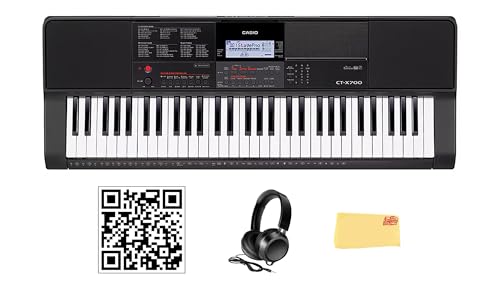
Casio CT-X700 61-Key Portable Keyboard Bundle with Headphones, Austin Bazaar
61 full-size touch-responsive keys
View Today's Price
Novation Launchkey 49 White MK4 – 49 Semi-Weighted Key, USB, MIDI Keyboard
49 synth-action velocity-sensitive keys
View Today's PriceHow to Choose the Right Digital Keyboards
Choosing the right digital keyboard depends on how your experience level, key action preference, budget, and intended use interact—trade-offs that shift with your musical goals and living situation. A feature that’s perfect for a beginner practicing at home may be totally wrong for a gigging musician or a producer needing DAW integration. Our recommendation engine weighs your unique needs across five dimensions and matches you to the best-fit digital keyboard or piano in under 60 seconds.
About this guide
Digital Keyboards
Why Picking the Right Digital Keyboard Is Tricky
Choosing digital keyboards in 2026 is more complicated than most buyers expect. The market is flooded with digital keyboards from Yamaha, Roland, Casio, Kawai, and Korg, all jockeying for your attention in the $100–$800 range. The main trade-offs with digital keyboards come down to key action, sound engine quality, number of keys, and connectivity. For example, a $200 Casio CT-S300 digital keyboard gives you 61 unweighted keys and hundreds of voices, but sacrifices realistic piano feel and polyphony. Jump up to a $400–$500 Yamaha P71 or Alesis Recital Pro digital keyboard, and you get 88 weighted keys and a graded hammer action, which is essential for developing proper technique. Most buyers underestimate how much key action on digital keyboards affects long-term progress—semi-weighted or unweighted keys can actually hinder classical learning. Others chase high polyphony specs on digital keyboards but ignore speaker wattage or pedal compatibility, leading to frustration later. Price tiers for digital keyboards are not just about features, but about build quality and longevity. Many buyers get lured by flashy arranger features or built-in rhythms on digital keyboards, only to realize later that the core playing experience is lacking. It’s easy to get lost in the specs of digital keyboards and miss what actually matters for your goals.
What Actually Sets Digital Keyboards Apart
The real differentiators in digital keyboards are often overlooked by first-time buyers. Key action is the single most important factor: Yamaha’s Graded Hammer Standard (GHS) and Roland’s PHA-4 actions feel dramatically different from the springy, unweighted keys on most sub-$200 digital keyboards. Skip arranger digital keyboards unless you truly want built-in rhythms and auto-accompaniment—these features add cost and complexity, but don’t help with piano technique. Polyphony is another make-or-break spec for digital keyboards: 192-note polyphony is the baseline for serious practice, but even that can drop in layered or split modes. Don’t be fooled by massive voice counts on digital keyboards; the quality of the main piano sound matters far more than having 600 synth tones you’ll never use. Connectivity is another key separator among digital keyboards: Bluetooth MIDI and audio, USB host compatibility, and proper 1/4" pedal jacks are critical for modern workflows. Yamaha and Casio now bundle learning apps and Bluetooth as standard in the $350–$500 range of digital keyboards, while Korg and Roland excel in DAW integration for producers. If you want a true piano substitute, prioritize a full 88-key weighted action and a reputable sound engine in your digital keyboard. For portability or songwriting, a 61-key semi-weighted digital keyboard or MIDI controller may be the smarter bet.
How to Choose: Decision Factors and Interactions
Your ideal digital keyboard depends on how your musical goals, space, and budget interact. Room size and portability needs will dictate whether a 30-pound 88-key weighted digital keyboard or a compact 61-key arranger digital keyboard is realistic. If you’re a beginner aiming for classical technique, an 88-key weighted digital keyboard is non-negotiable—even if it means stretching your budget to $400–$500. But if you need a travel-friendly setup for gigs or music production, a 49- or 61-key MIDI controller digital keyboard with synth action is lighter and easier to transport, though you’ll sacrifice acoustic realism. Budget is the biggest constraint: under $300, expect compromises in key feel and speaker quality on digital keyboards; $400–$700 is where true value and longevity converge for digital keyboards. The quiz weighs your experience, key action preferences, usage location, budget, and musical goals to match you to the right digital keyboard fit. Beyond that, think about how often you’ll use digital keyboards, whether you’ll need Bluetooth or USB for lessons or DAW work, and if bundled accessories (stand, pedal, bench) are must-haves for your digital keyboard. Don’t overlook speaker wattage or pedal input type on digital keyboards—these small details can make or break your daily playing experience.
Buyer's guide
How to choose
1Core Performance Criteria
- Prioritize key action—Yamaha’s GHS and Roland’s PHA-4 actions deliver a realistic feel, while unweighted keys on sub-$200 models hinder technique development.
- Look for at least 192-note polyphony if you plan to play complex classical pieces or use layered sounds, as lower specs cause note dropouts.
- Speaker wattage matters: aim for at least 20W per channel for room-filling sound, since many built-in speakers distort at higher volumes.
- Sound engine quality trumps voice count—Yamaha’s CFX and Bösendorfer samples sound better than hundreds of generic synth tones.
- Check for Bluetooth MIDI/audio and USB host support if you want seamless integration with learning apps or DAWs.
- Sustain pedal compatibility is crucial—ensure there’s a standard 1/4" jack, as wireless pedals often introduce latency and frustration.
2Build Quality and Durability
- Midrange models ($400–$700) from Yamaha, Roland, and Casio offer more robust chassis and keybeds that withstand years of daily practice.
- Avoid ultra-light plastic builds in the under-$200 tier, as these often flex, rattle, and develop key noise after a year of use.
- Weighted action models are heavier (20–30 lbs) but more stable on stands and less prone to sliding or tipping during play.
- Look for metal reinforcement in the chassis and high-quality key bushings to reduce long-term wear and sticking.
- Check user reviews for reports of keybed issues or speaker rattling—these are common on budget models and hard to fix post-purchase.
- Warranty terms vary: Yamaha and Roland typically offer 2–3 years, while some budget brands only provide 12 months.
3Value and Price Analysis
- The $400–$700 range offers the best balance of action, sound, and features—Yamaha P71 and Alesis Recital Pro are standouts for value.
- Under $300, expect trade-offs in key realism, speaker quality, and build; these are suitable for casual play or young beginners only.
- Spending over $1,200 yields diminishing returns for most home users—extra voices and effects rarely justify the price jump.
- Watch for bundle deals including stands, benches, and pedals; these can save $50–$100 compared to buying accessories separately.
- Amazon and major retailers often run 20–30% discounts post-holiday or during back-to-school, making midrange models more accessible.
- Avoid chasing high voice counts or arranger features unless you’ll actually use them—these inflate prices without improving core playability.
4Use-Case Fit: Matching Keyboard to Your Needs
- Classical learners should always choose an 88-key weighted action for proper technique, even if it means stretching the budget.
- Songwriters and producers benefit from 49- or 61-key MIDI controllers with synth action and DAW integration, sacrificing piano realism for flexibility.
- Stage performers need robust build, quick setup, and reliable connectivity—Roland and Yamaha models excel in gigging environments.
- For small apartments or travel, prioritize compact 61-key or foldable models under 15 lbs, but expect a trade-off in sound depth.
- Teaching and lessons benefit from dual headphone outputs and split modes, features more common in midrange and up.
- If you want built-in lessons or app integration, check for Bluetooth MIDI and bundled software—Yamaha and Casio lead here in 2026.
5Common Mistakes and Pitfalls
- Many buyers underestimate the importance of key action, regretting unweighted keyboards when technique plateaus after a few months.
- Ignoring polyphony specs can lead to frustrating note dropouts, especially when using sustain or layering voices.
- Assuming all pedals are compatible is risky—verify the keyboard accepts a standard 1/4" sustain pedal for reliable performance.
- Overvaluing flashy features like hundreds of voices or rhythms often results in paying more for functions rarely used.
- Neglecting speaker wattage and placement leads to weak, tinny sound that disappoints in real-world practice or performance.
- Failing to check for USB host or Bluetooth MIDI support can limit future learning or production options, especially with modern apps.
6Maintenance and Longevity
- Keep keyboards dust-free and avoid liquids near the keys—spills are a leading cause of sticky or malfunctioning keybeds.
- Weighted-action models last longer with regular gentle cleaning and proper stand support to avoid chassis flex or warping.
- Replaceable power supplies and detachable sustain pedals extend the usable life of midrange and higher-end keyboards.
- Firmware updates via USB or Bluetooth can add features or fix bugs, so choose models with ongoing manufacturer support.
- Avoid stacking heavy items on top of the keyboard, as this can damage key action and internal electronics over time.
- Store in a padded case if transporting frequently—gig bags with reinforced corners are a must for stage and travel use.
FAQ
Frequently asked questions
Is it worth paying extra for weighted keys on a digital keyboard?
Absolutely—weighted keys, especially those using graded hammer action like Yamaha’s GHS or Roland’s PHA-4, are critical for developing proper finger strength and technique. If you’re learning classical piano or plan to transition to an acoustic instrument, this feature is non-negotiable. Semi-weighted or unweighted keyboards may be cheaper, but they don’t mimic the resistance or dynamic control of a real piano. Spending $400–$500 for an 88-key weighted model pays off in long-term skill development and playing enjoyment.
How does Yamaha compare to Casio for beginner digital pianos in 2026?
Yamaha and Casio both offer strong beginner digital pianos, but Yamaha’s P71 and P-series models are praised for their realistic GHS key action and authentic piano samples. Casio’s CT-S and PX lines are more affordable and often include more built-in voices and rhythms, making them appealing for exploration and fun. However, Casio’s keybeds are generally lighter and less nuanced than Yamaha’s. If your priority is piano realism and technique, Yamaha is worth the extra investment; for versatility and value, Casio is a solid choice.
What polyphony do I need for classical piano practice?
For classical piano practice, aim for at least 192-note polyphony. This ensures that even with sustained chords, fast passages, and layered sounds, you won’t experience note dropouts or cutoffs. Some advanced models offer 256-note polyphony, but 192 is the practical minimum for most students and hobbyists. Avoid keyboards with 64-note polyphony, as these can quickly become limiting, especially with the sustain pedal engaged or when using dual-voice modes.
Are arranger keyboards with lots of voices and rhythms worth it?
Arranger keyboards like the Casio CT-S300 or Yamaha DGX-670 can be fantastic for songwriters, teachers, and those who enjoy experimenting with different styles. However, if your main goal is to learn piano technique or classical repertoire, these features add cost and complexity without improving the core playing experience. For most beginners, a simpler 88-key weighted model offers better value and a more focused learning platform. Choose an arranger only if you’ll genuinely use the backing styles and extensive voice library.
Do I need Bluetooth or USB connectivity on my digital keyboard?
Bluetooth MIDI and USB connectivity are increasingly useful, especially if you plan to use learning apps, record to a DAW, or connect to external speakers. Yamaha and Casio now include Bluetooth in many $400–$700 models, making it easy to integrate with tablets and computers. If you’re serious about music production or want future-proof flexibility, prioritize these features. For pure piano practice, they’re nice to have but not essential.
How does the Alesis Recital Pro compare to the Yamaha P71?
The Alesis Recital Pro is a budget-friendly 88-key hammer-action digital piano, typically priced around $280–$320. It offers solid key feel for the price and includes a bench, but its sound engine and speaker quality are a step below the Yamaha P71. The P71, at around $500–$550, features a more realistic GHS key action, higher polyphony, and superior piano samples. If your budget allows, the P71 is the better long-term investment for serious practice.
What should I look for if I need a portable keyboard for gigs?
For gigging, prioritize a keyboard under 30 lbs with a robust build, reliable connectivity (standard 1/4" outputs), and quick setup features. Models like the Yamaha DGX-670 or Roland’s portable lines are designed for stage use, offering sturdy chassis and easy transport. Make sure the keyboard has a protective case or gig bag, and check user reviews for reliability under frequent transport. Don’t compromise on key action or sound quality just for portability—find a balance that suits your performance needs.
Best Digital Keyboards By Category
Related Guides
Amp Simulator Pedals
Amp style, tech type, stereo needs, and budget—get matched to the perfect amp sim pedal for your rig and workflow.
Amp Simulator Pedals & Preamps
Matched to your tonal goals, gig setup, budget, and experience—find the amp sim pedal or preamp that actually fits your needs.
Electronic Drum Kits
Matched to your music style, pad feel, space, and training needs—find the right e-drum kit for your unique practice setup.
Beginner Electric Guitars
Matched to your hand size, musical style, pickup preference, and budget—get your ideal beginner electric guitar in seconds.