Skip the research trap. Get your heavy-duty shredders in 60 seconds.
We scored 400+ heavy-duty shredders across 5 dimensions — answer 5 quick questions and we'll match you to YOUR best pick.

Powered by DecisionScore™
Each product is evaluated across 18 weighted criteria — covering performance, value, build quality, and real-world usability. Your quiz answers re-weight the criteria to match what matters most to you, so two people can get different #1 picks from the same data.
See the DecisionScore methodology →- 20-sheet cross-cut, P-4 security
- 60-minute continuous run time
- 7-gallon pullout basket
Find your perfect heavy-duty shredders
5 quick questions. No quiz-takes-10-minutes trap. A personalized match from 37 scored picks — with clear reasoning for every recommendation.
What type of shredding security do you need?
P-4 cross-cut shreds paper into small rectangular pieces (~400 per sheet). P-4/P-5 micro-cut produces confetti-sized particles (~1,000–1,900 per sheet) that are far harder to reconstruct.
- P-4 cross-cut is secure for most home and office needs.
- Micro-cut (P-4/P-5) is best for sensitive or confidential documents.
- Strip-cut is not recommended for anything beyond basic, non-sensitive paperwork.
As an Amazon Associate and affiliate partner we earn from qualifying purchases. Links on this page may earn us a commission at no extra cost to you. Full disclosure
Not ready for the quiz? Here are our overall top picks
These are our top-rated picks overall. For a recommendation matched to YOUR specific needs,
Aurora Anti-Jam 20-Sheet Crosscut CD/Paper and Credit Card Shredder, 7-Gallon
20-sheet cross-cut, P-4 security
View Today's Price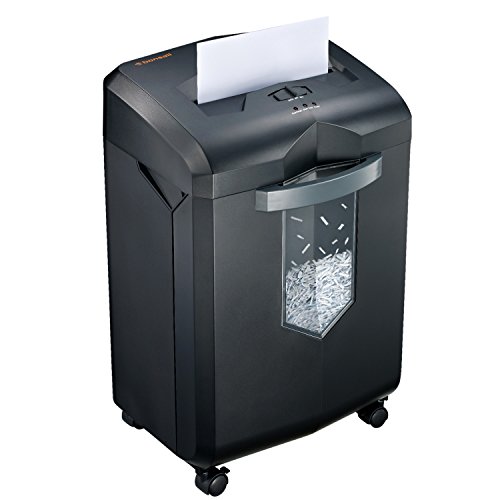
Bonsaii 18-Sheet Cross-Cut 60-Min Run Heavy Duty Paper Shredder
18-sheet cross-cut, P-4 security
View Today's Price
BONSEN 16-Sheet Heavy Duty Paper Shredder for Office, 60-Minute Running Time
16-sheet cross-cut, P-4 security
View Today's PriceHow to Choose the Right Heavy-Duty Shredders
Choosing the right heavy-duty shredder depends on how your security needs, shredding volume, available space, and budget interact—trade-offs that shift based on your office environment and workload. A feature that’s perfect for a busy HR department may be overkill for a home office, while a compact model might frustrate in high-volume settings. Our recommendation engine evaluates your specific needs across five key dimensions and matches you to the right shredder in under 60 seconds.
About this guide
Heavy-Duty Shredders
Why Heavy-Duty Shredders Are a Real Buying Challenge
Choosing heavy duty shredders in 2026 is trickier than it looks. The trade-offs start with sheet capacity: a $100 model like the Aurora AU120MA handles 12 sheets at a time, but step up to the $300–$400 Fellowes Powershred LX220 and you get 16–20 sheets plus auto-feed. Most buyers underestimate how quickly a 6-gallon bin on heavy duty shredders fills up during a big purge, or how a 10-minute run time on budget heavy duty shredders leads to frustrating cool-down breaks. Security level is another minefield—cross-cut (P-4) is fine for most, but micro-cut (P-4/P-5) heavy duty shredders are essential for tax or medical documents. Many shoppers ignore the impact of jam-prevention systems in heavy duty shredders and end up with machines that stall or overheat when pushed. Price tiers matter: under $150 gets you basic heavy duty shredders, $200–$350 is the sweet spot for jam-proof micro-cut heavy duty shredders, while $500+ commercial heavy duty shredders like the Dahle ShredMATIC SM 300 are overkill for most. The biggest mistake? Skipping regular oiling—no heavy duty shredder is truly “jam-proof” without it.
What Separates the Best: Specs and Features That Matter
Not all heavy duty shredders are created equal. The real differentiators among heavy duty shredders are cut type, run time, jam resistance, and auto-feed capability. Micro-cut heavy duty shredders like the Fellowes LX220 or Bonsaii C149-D offer far greater security than cross-cut models—skip cross-cut if you’re routinely shredding tax, HR, or legal documents. Jam-proof tech in heavy duty shredders is more than marketing: Fellowes and Dahle’s systems actually prevent 90% of user jams, but only if you oil the blades every 30 minutes of use. Auto-feed is a significant upgrade for bulk jobs with heavy duty shredders, but beware—auto-feed speeds are slower per sheet, and these models take up more space (think 20x15 inches for the Dahle SM 300). Quiet operation under 60 dB is rare in true heavy duty shredders, so don’t expect library silence during long sessions. Don’t chase maximum sheet ratings—real-world capacity drops if you’re shredding stapled or thick paper with heavy duty shredders. Unless you’re running a commercial office, the $200–$350 range for heavy duty shredders gets you 80–90% of premium performance without the massive footprint or price tag.
How to Choose: Interacting Factors and Real-World Fit
Your ideal heavy duty shredder depends on how security, volume, space, and budget interact. Shredding 100–500 sheets weekly? Prioritize heavy duty shredders with a 16–20 sheet, micro-cut model, at least a 20-minute run time, and a 6+ gallon bin. Small office? You’ll want jam-proof tech in heavy duty shredders and a footprint that fits under your desk—auto-feed may not be worth the space. If you need quiet operation from heavy duty shredders, expect to pay more or accept slightly lower capacity. Budget under $200? You’ll sacrifice run time and jam resistance in heavy duty shredders, so plan for more frequent breaks and maintenance. The quiz evaluates your needs for security, usage environment, sheet capacity, run time, and auto-feed convenience in heavy duty shredders. Don’t forget: sheet ratings assume plain paper—staples or thick stacks halve capacity and increase jam risk in heavy duty shredders. Always measure your available space before buying; many returns come from buyers surprised by the size of true heavy duty shredders. Maintenance is non-negotiable—monthly oiling and prompt bin emptying will keep even the best heavy duty shredders running smoothly for years.
Buyer's guide
How to choose
1Core Performance Criteria
- Look for at least 16-sheet capacity if you regularly shred large stacks; lower capacities slow you down and increase frustration.
- Continuous run times of 20–60 minutes are essential for heavy use—avoid models that overheat after just 10 minutes of shredding.
- P-4 micro-cut shredders offer the best security for sensitive documents, while cross-cut models are sufficient for everyday home office use.
- Jam-proof technology from brands like Fellowes and Dahle dramatically reduces downtime, but only when paired with regular oiling.
- Auto-feed features are invaluable for bulk shredding, but real-world speeds are slower than manual feed and require more space.
- A 6-gallon or larger pullout bin minimizes interruptions, letting you shred more before needing to empty the container.
2Build Quality and Durability
- Heavy-duty shredders from Fellowes, Bonsaii, and Dahle use reinforced steel blades and solid internal gears for long-term reliability.
- Plastic-bodied models under $150 tend to flex and develop alignment issues after a year of regular use—invest in metal chassis for durability.
- Jam-proof systems extend motor life by preventing overloads, but only if you avoid exceeding the rated sheet capacity.
- Commercial-grade units like the Dahle ShredMATIC SM 300 justify their higher price with quieter motors and thicker, more robust housings.
- Check for thermal protection and auto-shutoff features, which prevent burnout during extended shredding sessions.
- Regular oiling and cleaning are critical—neglecting maintenance leads to dull blades and shortened shredder lifespan, even on premium models.
3Value and Cost Analysis
- The $200–$350 range offers the best value, with models like the Fellowes LX220 delivering 80–90% of premium performance for most users.
- Budget models under $150 are tempting, but frequent jams and short run times make them a poor choice for real heavy-duty needs.
- Premium commercial models above $500, such as the Dahle SM 300, are only worth it for offices shredding reams daily.
- Bundles that include oil sheets or bottles add $20–$40 in value and help ensure long-term reliability.
- Consider total cost of ownership: replacement blades and frequent maintenance can add up over several years of use.
- Don’t overpay for features like CD shredding or ultra-quiet operation unless they’re truly essential for your workflow.
4Use-Case Fit and Environment
- Home offices benefit from compact, quieter models with 12–16 sheet capacity and 20-minute run times, like the Aurora AU120MA.
- Small businesses should target 16–20 sheet, micro-cut units with jam-proof tech and 6+ gallon bins for shared use.
- High-volume offices need auto-feed, commercial-grade shredders with 40–60 minute run times and large, easy-to-empty bins.
- Measure your available floor space—auto-feed and high-capacity models require up to 20x15 inches and may not fit under desks.
- If you frequently shred stapled documents, choose a model rated for staples and expect actual capacity to drop by 30–50%.
- Prioritize safety features like SafeSense if the shredder will be used in environments with children or frequent passersby.
5Common Mistakes and Pitfalls
- Skipping regular oiling causes even jam-proof shredders to clog and dull—use proper oil sheets every 30 minutes of shredding.
- Overestimating sheet capacity—ratings assume plain paper, but staples or thick stacks can halve real-world performance.
- Ignoring run time—budget models overheat quickly, forcing long cool-downs that disrupt workflow during big jobs.
- Underestimating shredder footprint—high-capacity and auto-feed models are much larger than most buyers expect.
- Assuming all micro-cut shredders are equally secure—check for P-4 or P-5 ratings for true confetti-like results.
- Neglecting bin size—small bins fill up fast during purge sessions, leading to frustrating interruptions and potential jams.
6Maintenance and Longevity
- Oil the blades every 30 minutes of use to prevent jams and extend the life of your shredder, regardless of brand claims.
- Empty the bin before it’s completely full—overstuffed bins are the number one cause of paper jams and motor strain.
- Clean sensors and feed slots monthly to maintain jam resistance and consistent performance, especially on auto-feed models.
- Replace worn blades or gears promptly; ignoring early signs of wear can cause catastrophic failure and void warranties.
- Store your shredder in a dry, dust-free area to prevent corrosion and electronics issues, especially in humid climates.
- Follow the manufacturer’s recommended maintenance schedule—neglecting routine care can shorten even a premium shredder’s lifespan by years.
FAQ
Frequently asked questions
Is micro-cut security worth paying extra for in 2026?
Absolutely—micro-cut shredders rated P-4 or P-5 reduce documents to confetti-sized particles, making reconstruction virtually impossible. For tax, medical, or HR paperwork, micro-cut is the gold standard. While cross-cut models suffice for everyday home use, the extra $50–$100 for micro-cut is a smart investment if you handle sensitive information. Brands like Fellowes and Bonsaii offer reliable micro-cut models in the $200–$350 range, providing both high security and solid performance. If privacy is a top concern, micro-cut is well worth the premium.
How does Fellowes compare to Bonsaii for heavy-duty shredders?
Fellowes leads with jam-proof technology, SafeSense safety features, and consistently longer run times—models like the LX220 are top-rated for reliability. Bonsaii, meanwhile, offers excellent value with models like the C149-C, delivering 60-minute run times and solid micro-cut security at a lower price point. Fellowes is the better choice for busy offices prioritizing jam resistance and safety, while Bonsaii shines for home users who want near-commercial performance affordably. Both brands are strong, but Fellowes edges out for high-volume, high-security environments.
What sheet capacity do I need for a small office?
For a small office shredding moderate volumes, aim for a 16–20 sheet capacity per pass. This range balances speed and machine size, letting you process stacks efficiently without constant feeding. Models like the Fellowes LX220 or Bonsaii C149-D hit this sweet spot. Avoid 12-sheet models unless your shredding needs are very light—otherwise, you’ll spend too much time feeding paper and risk more jams. If you regularly shred stapled documents, remember that real-world capacity drops by 30–50%.
Do I really need an auto-feed shredder for bulk jobs?
If you regularly shred large stacks—hundreds of sheets at a time—an auto-feed shredder is a huge time-saver. Models like the Dahle ShredMATIC SM 300 let you load 100–300 sheets and walk away while the machine works. However, auto-feed speeds are slower per sheet and these units require more floor space. For most home offices, manual feed is sufficient, but high-volume users will appreciate the convenience and efficiency of auto-feed. Consider your typical shredding workload before investing.
How often should I oil my heavy-duty shredder?
You should oil your shredder every 30 minutes of active use, regardless of brand or jam-proof claims. Use dedicated shredder oil or lubricant sheets—improvised substitutes can damage the blades. Regular oiling keeps the cutting mechanism sharp, reduces jams, and extends the machine’s lifespan. Skipping this step is the most common cause of performance issues, even on premium models like Fellowes or Dahle. Set a reminder if you shred in large batches to avoid costly repairs down the line.
Are there any quiet heavy-duty shredders for shared workspaces?
True heavy-duty shredders are rarely silent, but models like the Fellowes Powershred LX220 and Dahle SM 300 operate under 60 dB, making them suitable for shared offices. Expect some noise during long sessions, especially with high sheet loads. If quiet operation is crucial, prioritize models specifically rated for low noise and consider trading off a bit of capacity for a more peaceful work environment. Always check real user reviews for honest assessments of noise levels in practice.
What are the most common mistakes buyers make with heavy-duty shredders?
The top mistakes are skipping regular oiling, overestimating sheet capacity (especially with staples), ignoring run time limits, and underestimating the machine’s size. Many buyers also neglect bin capacity, leading to frequent interruptions or jams. Choosing a model based solely on price often results in frustration—budget units can’t handle true heavy-duty workloads. Always match the shredder’s specs to your real-world needs, measure your available space, and follow the manufacturer’s maintenance guidelines for best results.
Best Heavy-Duty Shredders By Category
Related Guides
3D Printers
Matched to your print size, detail needs, materials, and how much you want to tinker or automate.
All-in-One Laser Printers for Home Office
Matched to your print volume, color needs, workflow features, and budget—get the right laser all-in-one for your home office.
Sit-Stand Desk Converters
Matched to your desk size, equipment weight, ergonomics, and feature preferences—get the right converter for your workflow.
Budget and Mid‑Range Laptops
Matched to your main tasks, OS preference, portability, and display—find a laptop that fits your real workflow and budget.
Color Laser Printers
Matched to your print volume, connectivity, and cost priorities—find the color laser printer that fits your workflow and space.