Skip the research trap. Get your studio monitor speakers in 60 seconds.
We scored 550+ studio monitor speakers across 5 dimensions — answer 5 quick questions and we'll match you to YOUR best pick.
Powered by DecisionScore™
Each product is evaluated across 18 weighted criteria — covering performance, value, build quality, and real-world usability. Your quiz answers re-weight the criteria to match what matters most to you, so two people can get different #1 picks from the same data.
See the DecisionScore methodology →- 6.5-inch woofer and 1.0-inch tweeter for powerful sound
- Frequency response from 40 Hz to 22 kHz provides full-range clarity
- 80 W of amplification gives headroom for mixing
Find your perfect studio monitor speakers
5 quick questions. No quiz-takes-10-minutes trap. A personalized match from 53 scored picks — with clear reasoning for every recommendation.
What will you primarily use your monitors for?
Selecting monitors based on how you'll use them helps you find the right balance of accuracy, power and features. Mixing monitors focus on a flat response, DJ monitors emphasise bass and durability, multimedia options are compact and versatile, and high‑end mastering monitors deliver unmatched fidelity. If unsure, pick mixing/production.
- Mixing and production require flat, honest monitors—avoid models with hyped bass or treble for these tasks.
- DJing and electronic music benefit from deeper bass and higher output, so larger woofers may be better.
- For multimedia or casual listening, compact monitors with multiple inputs offer flexibility and easier placement.
As an Amazon Associate and affiliate partner we earn from qualifying purchases. Links on this page may earn us a commission at no extra cost to you. Full disclosure
Not ready for the quiz? Here are our overall top picks
These are our top-rated picks overall. For a recommendation matched to YOUR specific needs,
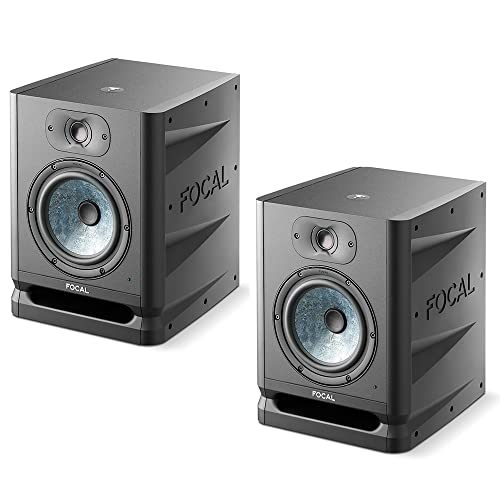
Focal Alpha 65 Evo 6.5" Mixing Monitor (Pair)
6.5-inch woofer and 1.0-inch tweeter for powerful sound
View Today's Price
KALI AUDIO LP-6 V2 6.5-inch Powered Studio Monitor - White
6.5-inch woofer and 1.0-inch tweeter for powerful sound
View Today's Price
Neumann KH 120 II DSP Powered Studio Monitor - White
5.25-inch woofer and 1.0-inch tweeter for balanced sound
View Today's PriceHow to Choose the Right Studio Monitor Speakers
Choosing the right studio monitor speakers depends on your room size, workflow, bass preferences, and connectivity needs—trade-offs that shift based on your setup and musical style. A feature that’s perfect for a large treated studio can ruin mixes in a small apartment, while budget constraints limit which specs are realistic. Our recommendation engine evaluates your specific needs across five dimensions and matches you to the ideal monitors in under 60 seconds.
About this guide
Studio Monitor Speakers
Why Studio Monitor Shopping Is Trickier Than It Looks
Studio monitors aren’t just fancy speakers—they’re precision tools, and picking the right studio monitors is tougher than most buyers expect. The trade-offs with studio monitors start with size: a compact 4-inch studio monitor fits perfectly on a crowded desk but simply can’t deliver the deep bass or room-filling power of an 8-inch studio monitor. Yet, drop a big 8-inch studio monitor in a tiny room and you’ll drown in muddy low end and reflections. Most buyers fixate on wattage or loudness, but miss the real point: flat, uncolored sound is what matters for mixing on studio monitors, not party-level bass or volume. Price tiers are real: $200 studio monitors can sound boxy or harsh, while $800+ studio monitors like Genelec or Adam offer surgical detail and built-in DSP for room correction. Many get tripped up by port design—front-ported studio monitors work better against walls, while rear-ported studio monitors need space. And don’t assume all studio monitors are “active”—some still require an external amp. The biggest mistake? Shopping for studio monitors by brand or buzzwords instead of matching studio monitor specs to your actual space and workflow.
What Actually Sets Studio Monitors Apart
The specs and features that matter most for studio monitors in 2026 go far beyond brand names or driver size. Built-in DSP and EQ presets are now common on premium studio monitors like the Genelec 8050B and Neumann KH80 DSP, letting you tune your studio monitors to your room—skip this unless your space is tricky or you’re chasing perfection. Input options are critical for studio monitors: XLR and TRS are must-haves for pro audio interfaces, but RCA or Bluetooth only matter if you’re mixing in multimedia sources. Don’t get distracted by wattage—focus on frequency response and how flat the studio monitors really sound. Three-way studio monitor systems (like Adam S2V) deliver better midrange clarity, but are overkill for small rooms. Port design is make-or-break: front-ported studio monitors are more forgiving for tight spaces, while rear-ported studio monitors demand at least a foot of clearance from the wall. If you’re not producing bass-heavy genres, a 5-inch woofer on your studio monitors is often ideal—don’t buy 8-inch studio monitors just for bragging rights. Brands like Focal and Kali are pushing value with excellent 6.5-inch studio monitors, but always check real-world reviews of studio monitors, not just spec sheets.
How to Weigh the Decision Factors That Matter
Room size, listening distance, and your mixing style all interact in ways most buyers overlook when choosing studio monitors. A small desktop setup pairs best with 3–5-inch studio monitors, while a medium home studio can handle 6.5-inch or even 8-inch studio monitors if you have space. Your bass preference should match your genre—deep, punchy bass for electronic music means larger woofers or a sub with your studio monitors, but for guitar or voice work, balanced or minimal bass is easier to mix on studio monitors. Connectivity needs can rule out otherwise great studio monitors: if your interface only outputs XLR, don’t buy studio monitors with only RCA. Voicing is personal—some prefer a slightly warm or bright sound, but for critical mixing, neutral studio monitors are safest. Our quiz evaluates your use case, room size, bass needs, connectivity, and voicing in one go to help you find the right studio monitors. To make the smartest choice, map your actual workflow and space to the studio monitor specs: don’t overspend on studio monitor features you won’t use, but don’t under-buy studio monitors and regret it later. Always consider how your studio monitors will interact with your room acoustics and the rest of your gear.
Buyer's guide
How to choose
1Core Performance Criteria
- Flat frequency response is non-negotiable for mixing—avoid monitors with hyped bass or treble, even if they sound impressive at first listen.
- Woofer size directly affects low-end extension: 5-inch is balanced for most, while 8-inch delivers deeper bass but can overwhelm small rooms.
- Look for at least 40Hz–20kHz frequency response for full-range accuracy; budget models often roll off below 60Hz, missing critical lows.
- Total wattage matters less than headroom; aim for 50W+ per channel for clean, undistorted playback at moderate levels in home studios.
- Check for low distortion specs (THD <0.05%) to ensure clarity, especially at higher volumes or when mixing complex material.
- Front-ported designs minimize bass buildup near walls, while rear-ported models need extra space to avoid muddying the sound.
2Build Quality and Durability
- Premium brands like Genelec and Adam use dense MDF or aluminum cabinets, reducing resonance and lasting years longer than plastic enclosures.
- Look for solid, well-damped cabinets—flimsy builds rattle at high volumes and color your mixes, especially in budget models under $300.
- High-quality amplifiers inside active monitors run cooler and resist failure; cheap amps can introduce hiss or fail after heavy use.
- Check for reliable input jacks—loose or poorly soldered connectors are a common failure point, especially on value-tier monitors.
- Protective grilles are rare but valuable if your studio doubles as a shared or high-traffic space, especially with pets or kids.
- Warranty length reflects confidence: Genelec and Focal offer 2–5 years, while some budget models only cover a single year.
3Value Analysis and Price Tiers
- Expect to pay $200–$300 for solid entry-level pairs, but true accuracy and power usually start around $500 per pair from brands like Kali or PreSonus.
- Premium models ($800+) add DSP, better amps, and tighter tolerances—worth it for mastering or pro studios, but overkill for casual use.
- Mid-tier monitors from Focal or Adam often hit a sweet spot: real studio performance without the price tag of flagship three-way systems.
- Don’t overspend on wattage or features you’ll never use—match your budget to your actual workflow and room size.
- Factor in the cost of stands, isolation pads, and cables; these can add $50–$150 to your setup for optimal performance.
- Skip battery-powered or party-oriented speakers—these prioritize volume and bass over accuracy, making them a poor value for studio work.
4Use-Case Fit and Application
- Mixing and production require honest, neutral monitors—avoid models with built-in bass boost or ‘smile’ EQ curves.
- DJing and electronic music benefit from deeper bass; look for 6.5- or 8-inch woofers and front ports for punch without muddiness.
- Desktop and small rooms work best with compact 4- or 5-inch monitors; larger speakers can overwhelm and create acoustic problems.
- Mastering or audiophile listening justifies investment in premium three-way or DSP-corrected models for maximum detail retrieval.
- Multimedia and casual use can prioritize versatility—multiple inputs and Bluetooth are nice-to-haves, but not essential for mixing.
- If you move your setup often, lightweight or compact models like Avantone MixCubes are easier to reposition and less prone to damage.
5Common Mistakes and Pitfalls
- Prioritizing loudness over accuracy—party speakers like JBL PartyBox sound fun but won’t translate mixes correctly in a studio context.
- Ignoring room acoustics; even the best monitors sound bad in untreated spaces, so budget for basic acoustic treatment.
- Buying oversized monitors for small rooms leads to boomy, uncontrolled bass and poor imaging—size to your space, not your ego.
- Assuming all monitors are active; some still require an external amplifier, so always double-check before buying.
- Overlooking input compatibility—pro interfaces need XLR or TRS, while consumer gear may only offer RCA or Bluetooth.
- Neglecting to check return policies; some monitors sound great in reviews but clash with your room or workflow in practice.
6Maintenance and Longevity
- Keep vents and ports dust-free; clogged bass ports on rear-ported monitors can cause unwanted noise and reduce bass clarity.
- Allow for proper ventilation around amplifiers—overheating shortens lifespan, especially in compact or poorly ventilated setups.
- Use surge protectors to prevent electrical damage; a single power spike can kill internal amps or DSP boards.
- Regularly check and reseat input cables; loose connections are a leading cause of hum, buzz, or intermittent dropouts.
- Avoid stacking items on top of monitors—added weight can damage tweeters or deform cabinets over time.
- Update DSP firmware if your monitors support it; manufacturers like Genelec and Neumann release updates to improve performance and fix bugs.
FAQ
Frequently asked questions
Is built-in DSP room correction worth the extra cost in 2026?
Built-in DSP room correction, as found in models like the Genelec 8050B and Neumann KH80 DSP, is absolutely worth it if your studio space is acoustically challenging or untreated. It lets you tailor the monitor’s response to your room, correcting for bass buildup and reflections that can skew your mix. For most home studios, this feature delivers a noticeable upgrade in accuracy, but if your space is already well treated, you can save money by skipping DSP and investing in better monitors or room treatment instead.
How do Adam, Focal, and Kali studio monitors compare for home studios?
Adam, Focal, and Kali each have strong reputations in 2026. Adam’s S2V and T Series are known for their ultra-detailed ribbon tweeters and precise stereo imaging, making them a favorite for mixing. Focal’s Alpha line delivers a slightly warmer, more forgiving sound, ideal for long sessions. Kali’s LP and IN series hit a sweet spot for value, offering accurate, flat response at prices under $500 per pair. For most home studios, Kali offers the best balance of price and performance, while Adam and Focal are top picks for those chasing premium detail or a specific voicing.
What size studio monitor is best for a small apartment or desktop setup?
For small apartments or desktop setups, a 4-inch or 5-inch studio monitor is ideal. These compact models, like the Avantone MixCubes or Kali LP-5, provide accurate sound without overwhelming your space with excessive bass or volume. Larger monitors can create acoustic problems in tight rooms, making mixes sound muddy. Always measure your available desk space and listening distance—if you’re sitting within four feet of the speakers, 5-inch drivers will give you the best clarity and imaging.
Do I need an 8-inch woofer for electronic music production?
An 8-inch woofer isn’t strictly necessary for electronic music, but it does provide deeper, punchier bass that helps you hear sub frequencies clearly. If you produce bass-heavy genres like EDM or hip-hop, an 8-inch monitor or a 6.5-inch with a subwoofer will help your mixes translate on club systems. However, in small rooms, large woofers can cause bass buildup and muddiness—consider your room size before upgrading, and remember that proper acoustic treatment is just as important as woofer size.
Are rear-ported monitors a problem if my desk is against the wall?
Yes, rear-ported monitors can be problematic if you need to place them close to a wall. The rear port amplifies bass frequencies, which can result in boomy, uncontrolled low end when positioned against a wall. In this case, choose front-ported or sealed monitors, or leave at least 12 inches of clearance behind rear-ported models. If space is tight, compact front-ported monitors like the Kali LP-6 or sealed Avantone MixCubes are a safer bet for accurate mixing.
What connectivity should I look for in 2026 studio monitors?
For most modern setups, XLR or TRS balanced inputs are essential—they minimize noise and match the outputs on audio interfaces and mixers. Some monitors add RCA or even Bluetooth for multimedia or consumer gear, but these are less important for serious production. Always check that your monitors match your interface’s outputs. Advanced models may offer digital inputs or network control, but for 99% of users, balanced analog connections are all you need for reliable, noise-free operation.
How do I know if my monitors are truly ‘neutral’ for mixing?
True neutrality means the monitor’s frequency response is flat, with no artificial boost in the bass or treble. Check manufacturer specs and, more importantly, independent lab measurements and user reviews. Brands like Genelec, Adam, and Neumann are known for their honest voicing. If possible, listen to reference tracks you know well on the monitors before buying. Remember, room acoustics can alter perceived neutrality—use basic acoustic treatment and, if available, built-in DSP correction to maintain accuracy.
Best Studio Monitor Speakers By Category
Related Guides
Acoustic Panels
Room type, frequency issues, installation, and budget—get matched to the right acoustic panels for your space and sound goals.
Audio Interfaces
Matched to your workflow, input needs, computer ports, and how critical low-latency performance is for your sessions.
Digital Audio Recorders
Matched to your recording style, mic setup, budget, and portability needs—get the right audio recorder for your workflow.
Field Recorders
Matched to your skill level, channel needs, budget, and whether you’ll use it for music, film, or fieldwork.
Professional Studio Headphones
Matched to your workflow, budget, comfort, and whether you need isolation for tracking or accuracy for mixing.