Skip the research trap. Get your smart ceiling fans in 60 seconds.
We scored 250+ smart ceiling fans across 5 dimensions — answer 5 quick questions and we'll match you to YOUR best pick.

Powered by DecisionScore™
Each product is evaluated across 18 weighted criteria — covering performance, value, build quality, and real-world usability. Your quiz answers re-weight the criteria to match what matters most to you, so two people can get different #1 picks from the same data.
See the DecisionScore methodology →- 10‑speed reversible DC motor with nature breeze mode
- Bright 1,900‑lumen LED light with color temperature range 2700–4000 K
- Reliable WiFi module for app and voice control (Alexa, Google, Siri Shortcuts)
Find your perfect smart ceiling fans
5 quick questions. No quiz-takes-10-minutes trap. A personalized match from 21 scored picks — with clear reasoning for every recommendation.
What size space will the fan serve?
Select the room size you’re cooling. Small rooms use fans under 50 inches; medium rooms work best with 50–60 inch fans; large rooms need 60–70 inch fans, and extra‑large great rooms require fans over 70 inches. If unsure, pick medium.
- Measure your room before choosing—blade span should roughly match the room’s longest dimension for balanced airflow.
- Small bedrooms or offices (under 150 sq ft) typically need fans under 50 inches; large open spaces require 60 inches or more.
- For vaulted ceilings, use a downrod extension to ensure the fan hangs at the optimal height for air circulation.
As an Amazon Associate and affiliate partner we earn from qualifying purchases. Links on this page may earn us a commission at no extra cost to you. Full disclosure
Not ready for the quiz? Here are our overall top picks
These are our top-rated picks overall. For a recommendation matched to YOUR specific needs,
Smafan Antrim Smart Ceiling Fan 52"
10‑speed reversible DC motor with nature breeze mode
View Today's Price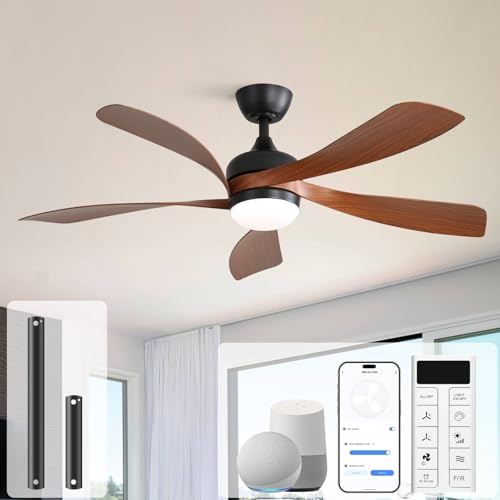
Sofucor Curved Blade Smart Ceiling Fan 52"
Elegant curved wooden blades create a statement piece
View Today's Price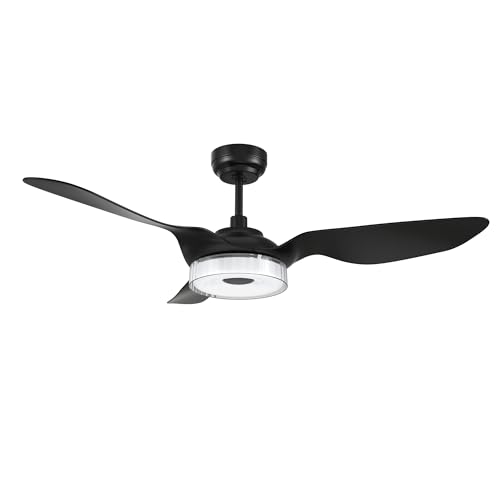
Carro Icebreaker Smart Ceiling Fan 52"
Medium 52‑inch version retains the Icebreaker’s bright 3,000‑lumen LED
View Today's PriceHow to Choose the Right Smart Ceiling Fans
Choosing the right smart ceiling fan depends on room size, lighting needs, control preferences, and installation location—trade-offs that shift based on your actual space and smart home setup. A feature that’s perfect for a large, open-plan living room might be a poor fit for a compact bedroom or outdoor patio. Our recommendation engine evaluates your specific requirements across five dimensions and matches you to the right smart ceiling fan in under 60 seconds.
About this guide
Smart Ceiling Fans
Why Smart Ceiling Fan Shopping Is Tricky
Buying smart ceiling fans in 2026 means navigating a maze of trade-offs that most shoppers underestimate. Room size isn’t just about blade span—installing a 72-inch smart ceiling fan like the Home Decorators Kensgrove in a small bedroom is overkill, while a 52-inch Minka-Aire Sleek smart ceiling fan will barely move air in a vaulted great room. Lighting is another minefield: some smart ceiling fans offer only fixed warm-white modules, but others deliver fully tunable RGB rings that can set any mood, from cozy to party-ready. Price tiers are stark: $180 gets you basic smart ceiling fans with remote control and fixed lighting, while $600–$800 brings nine-speed DC motors, app and voice integration with Alexa, Google, and SmartThings, and premium finishes. Most buyers get tripped up by ignoring mounting requirements—outdoor-rated smart ceiling fans with weather-sealed motors are essential for patios, while flush-mount smart ceiling fans are a must for low ceilings. Overlooking these details leads to noisy operation, poor airflow, or even premature failure. The real challenge isn’t just picking a style—it’s matching smart ceiling fan specs to your actual space, control needs, and budget.
What Really Sets Smart Fans Apart
The biggest differentiators among smart ceiling fans in 2026 are motor type, control ecosystem, lighting flexibility, and build quality. DC motors, like those in the WAC Lighting Mocha XL smart ceiling fan, run quieter, use less energy, and offer more speed settings than old-school AC motors—skip AC unless you’re on a strict budget or only need basic features from your smart ceiling fans. Voice and app integration is a significant upgrade: brands like Carro and WAC Lighting offer seamless Alexa, Google, and SmartThings support in their smart ceiling fans, while budget models may only provide a clunky remote. Lighting isn’t just about brightness—smart ceiling fans with RGB or tunable white LEDs let you adapt ambiance for any activity, but simple fixed modules are fine if you already have layered lighting. Outdoor-rated smart ceiling fans with sealed motors and ABS blades are non-negotiable for patios or humid climates; don’t risk indoor-only smart ceiling fans outside. Skip “statement” chandelier smart ceiling fans unless you want a centerpiece—these often sacrifice airflow for looks. Prioritize reversible airflow in your smart ceiling fans for year-round comfort, and don’t pay extra for features you’ll never use.
How to Actually Choose the Right Fan
Room size, ceiling height, and installation location all interact to determine which smart ceiling fan specs you need—oversized smart ceiling fans in small rooms waste energy and create drafts, while undersized smart ceiling fans in large spaces leave you sweating. Budget is a reality check: high-end smart ceiling fans with nine-speed DC motors, RGB lighting, and full smart integration cost $500–$800, while solid mid-tier smart ceiling fans with adjustable white LEDs and app control land in the $250–$400 range. Design style matters, but don’t let looks override function—flush-mount smart ceiling fans are essential for ceilings under 8 feet, and only damp- or wet-rated smart ceiling fans survive on patios. Lighting needs depend on your space: if your smart ceiling fan is your main light source, prioritize adjustable brightness and color temperature. Our quiz evaluates room size, style, lighting, control preferences, and install location to match you with the right smart ceiling fan. For best results, weigh airflow needs, control ecosystem, and mounting constraints together—don’t let a single feature drive your smart ceiling fan decision.
Buyer's guide
How to choose
1Core Performance Criteria
- Choose a fan with a blade span matched to your room—72 inches for great rooms, 52–60 inches for most living spaces, and under 50 inches for bedrooms.
- Look for DC motors, such as those in WAC Lighting and Carro models, for quiet operation, energy savings, and more precise speed control.
- Prioritize reversible airflow to enable year-round comfort—this is essential for circulating warm air in winter and cooling in summer.
- Check the airflow rating (CFM); great room fans should deliver at least 6,000 CFM, while bedrooms need 3,000–4,000 CFM for effective circulation.
- Lighting quality matters—fans with tunable white or RGB LEDs offer more flexibility than fixed warm-white modules, especially if the fan is your main light.
- Ensure smart integration covers your preferred ecosystem—Alexa, Google, and SmartThings are standard on premium fans, but often missing on budget models.
2Build Quality and Durability
- Outdoor and patio fans must use weather-resistant ABS blades and sealed motors to prevent rust and motor failure in damp or humid environments.
- Premium brands like Minka-Aire and WAC Lighting offer thicker blade construction and better motor bearings, which reduce wobble and extend lifespan.
- Flush-mount fans for low ceilings should have reinforced housings to minimize vibration and noise, especially in bedrooms or offices.
- Check for a robust mounting system—cheap fans often cut corners here, leading to sagging or rattling after a year of use.
- Look for UL damp or wet ratings if you plan to install in bathrooms, patios, or any semi-outdoor space; indoor-only fans will not last.
- Warranty length is a quality signal: top brands offer 3–5 years on motors and at least 1 year on electronics and lighting modules.
3Value Analysis
- Entry-level smart fans start around $180 but often lack advanced controls and use less efficient AC motors, so weigh the long-term energy savings of DC models.
- Mid-tier fans ($250–$400) typically add app control, adjustable lighting, and better build quality—this is the sweet spot for most buyers.
- Premium models ($500–$800) justify the price with nine-speed DC motors, full smart integration, and sculpted blade designs for silent operation.
- Avoid paying extra for statement or chandelier styles unless you truly want a centerpiece; these often sacrifice airflow and practicality.
- Consider the total cost, including downrod extensions or smart wall switches, which can add $20–$100 to your installation.
- Don’t be fooled by flashy features—prioritize airflow, motor quality, and compatibility with your smart home ecosystem over superficial add-ons.
4Use-Case Fit
- Large, vaulted living rooms or great rooms require 66–72 inch fans with high CFM ratings and long downrods for effective air movement.
- Bedrooms and offices benefit from quieter, flush-mount fans with reversible airflow and dimmable warm-white lighting for comfort and ambiance.
- Covered patios need damp-rated fans with ABS blades and sealed motors—never install indoor-only fans outdoors, even under a roof.
- Low-ceiling spaces demand flush-mount or low-profile fans under 12 inches tall to maintain safe clearance and avoid visual clutter.
- If your fan is the main light source, choose models with tunable white or RGB LEDs for maximum flexibility in brightness and color temperature.
- For tech-savvy users, prioritize fans with full app, voice, and remote control integration—this ensures seamless operation from anywhere in your home.
5Common Mistakes
- Installing a fan too large for a small room creates uncomfortable drafts and wastes energy—always match blade span to room dimensions.
- Ignoring mounting height leads to clearance issues; flush-mount fans are essential for ceilings under 8 feet, while high ceilings need downrod extensions.
- Choosing indoor-only fans for outdoor or damp locations results in rapid motor failure and voided warranties—always check the UL rating.
- Overlooking airflow (CFM) means you may end up with a stylish but ineffective fan that barely circulates air in larger spaces.
- Assuming all smart fans support your ecosystem—many budget models lack Alexa, Google, or SmartThings integration, so double-check compatibility.
- Neglecting reversible airflow means missing out on winter energy savings and year-round comfort—don’t settle for single-direction fans.
6Maintenance and Longevity
- DC motors require less maintenance and typically last longer than AC motors, making them a better investment for high-use rooms.
- Clean blades every few months to prevent dust buildup, which can unbalance the fan and reduce efficiency over time.
- Check mounting hardware annually for signs of loosening or vibration—tighten as needed to prevent wobble and noise.
- Replace integrated LED modules only with manufacturer-approved parts; using generic replacements can void your warranty and cause flickering.
- Outdoor fans should be inspected seasonally for signs of corrosion or water ingress, especially after storms or humid weather.
- Keep firmware updated on smart fans to maintain compatibility with voice assistants and prevent connectivity issues as platforms evolve.
FAQ
Frequently asked questions
Is full smart integration with Alexa or Google Assistant worth paying extra for?
If you use voice assistants daily or want seamless automation, paying extra for full Alexa and Google Assistant integration is absolutely worth it. Brands like Carro and WAC Lighting offer reliable voice, app, and remote control, letting you adjust speed, lighting, and scheduling hands-free. Cheaper models may only support a basic remote or clunky proprietary app, which can be frustrating. For smart homes, investing in true multi-platform compatibility ensures long-term convenience and avoids headaches as your ecosystem grows.
How does the Minka-Aire Sleek F868L compare to the WAC Lighting Mocha Smart Fan?
The Minka-Aire Sleek F868L excels in modern style and quiet operation, using a DC motor for energy efficiency and smooth speed transitions. The WAC Lighting Mocha Smart Fan offers a slightly larger span (54 inches vs. 52 inches) and integrates natively with Alexa, Google, and SmartThings, making it more versatile for smart home setups. Both provide dimmable LED lighting, but WAC’s app control is more robust. For pure aesthetics and whisper-quiet use, Minka-Aire wins; for smart features and flexibility, WAC Lighting is the better pick.
What blade span do I need for a large living room?
For large living rooms, especially those over 400 square feet or with vaulted ceilings, choose a fan with at least a 60-inch blade span. Models like the Home Decorators Kensgrove 72" or WAC Lighting Mocha XL 66" deliver optimal airflow (6,000+ CFM) and prevent hot spots. Using a fan that’s too small will result in uneven cooling and wasted energy. Always check the manufacturer’s recommended room size and use a downrod extension for ceilings over 9 feet to maximize performance.
Are RGB or tunable white LED lights on ceiling fans practical?
RGB and tunable white LEDs are practical if your ceiling fan is the main light source or you want ambiance flexibility. Tunable white allows you to shift from warm to cool tones for different activities, while RGB lets you set mood lighting for entertaining or relaxation. However, these features add cost and complexity. If you already have layered lighting or rarely change color temperature, a simple dimmable warm-white module may suffice. Prioritize tunable lighting in multipurpose rooms or open-plan spaces.
Can I use an indoor-rated smart fan on a covered patio?
No, using an indoor-rated smart fan on a covered patio is a recipe for early failure. Even under a roof, humidity and temperature swings can corrode motors and damage electronics. Always choose a fan with a UL damp or wet rating, sealed motor, and ABS blades for outdoor use. Brands like WAC Lighting and Carro offer dedicated indoor/outdoor models designed to withstand the elements. Installing the wrong type voids warranties and can lead to dangerous malfunctions.
How do Carro smart ceiling fans compare to Hunter and Dreo?
Carro fans stand out for their robust smart integration, supporting Alexa, Google, and SmartThings natively, and offering app, voice, and remote control. Hunter fans are known for classic styling and reliable AC motors, but often require add-on modules for smart features. Dreo focuses on value pricing and simple app control, but may lack advanced lighting or voice support. For the best blend of smart features and performance, Carro leads; for traditional looks, Hunter is solid; for tight budgets, Dreo is a contender.
What maintenance is required to keep a smart ceiling fan running smoothly?
Regular maintenance includes dusting blades every few months, checking for loose screws or mounting hardware annually, and updating the fan’s firmware via its app to maintain smart compatibility. For outdoor fans, inspect for corrosion or water ingress after storms. Replace integrated LED modules only with manufacturer-approved parts. DC motors need little maintenance, but listening for unusual noises can catch issues early. Keeping your fan clean and updated ensures quiet, efficient operation and maximizes its lifespan.
Related reading
Best Smart Ceiling Fans By Category
Related Guides
Automatic Pet Feeders
Matched to your pet’s food type, number of pets, feeding schedule, and the features you’ll actually use.
Upgrade Your Home Security with DIY Smart Products
We match you to the right cameras, locks, doorbells, and Wi-Fi—based on your home, tech comfort, budget, and security priorities.
Top Products to Make Your Home More Energy Efficient
Matches you to smart thermostats, ACs, and appliances based on your climate, home type, budget, and comfort with tech.
Home Security Cameras
Mounting, power, resolution, storage, and smart features—get a security camera matched to your home, habits, and privacy needs.
Home Weather Stations
Matched to your climate, installation site, data needs, and how serious you are about weather tracking.