Skip the research trap. Get your home security cameras in 60 seconds.
We scored 300+ home security cameras across 5 dimensions — answer 5 quick questions and we'll match you to YOUR best pick.

Powered by DecisionScore™
Each product is evaluated across 18 weighted criteria — covering performance, value, build quality, and real-world usability. Your quiz answers re-weight the criteria to match what matters most to you, so two people can get different #1 picks from the same data.
See the DecisionScore methodology →Find your perfect home security cameras
5 quick questions. No quiz-takes-10-minutes trap. A personalized match from 29 scored picks — with clear reasoning for every recommendation.
Where will you mount the camera?
Indoor cameras lack weatherproofing, while outdoor models withstand rain and sun. Some cameras work in both locations, giving flexibility.
- Outdoor cameras need IP65+ weatherproofing for rain, dust, and sun exposure.
- Indoor cameras are easier to install and don’t require weather protection.
- Hybrid models like TP-Link Tapo C246D can work both indoors and outdoors.
As an Amazon Associate and affiliate partner we earn from qualifying purchases. Links on this page may earn us a commission at no extra cost to you. Full disclosure
Not ready for the quiz? Here are our overall top picks
These are our top-rated picks overall. For a recommendation matched to YOUR specific needs,
Google Nest Cam Outdoor or Indoor, Battery - 2nd Generation 2 Pack with Extra
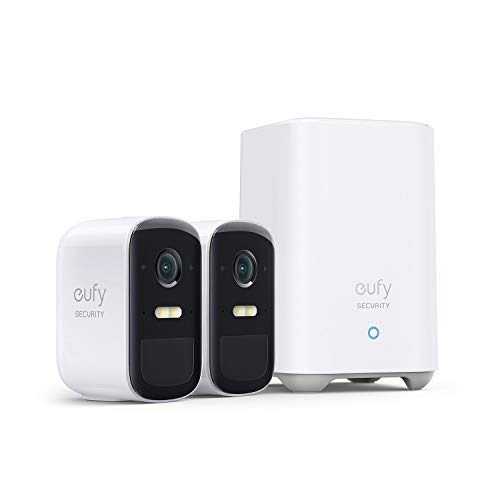
eufy security, eufyCam 2C Pro 2-Cam Kit, Wireless Home Security System with 2K

Lorex 4K 8MP Wi-Fi 6 Spotlight Security Camera | Indoor/Outdoor | Color Night
How to Choose the Right Home Security Cameras
Choosing the right home security camera depends on where you’ll mount it, how you’ll power it, the resolution you need, and your storage preferences—trade-offs that shift based on your home’s layout, WiFi strength, and privacy concerns. Generic top-10 lists can’t account for how these factors interact: a feature that’s perfect for a large backyard is overkill for a studio apartment. Our recommendation engine evaluates your specific needs across five dimensions and matches you to the right camera in under 60 seconds.
About this guide
Home Security Cameras
Why Home Security Camera Choices Are More Complicated Than Expected
Picking home security cameras in 2026 is a balancing act that most buyers underestimate. The difference between a $100 Blink Outdoor 4 and a $550 EufyCam 3 kit isn’t just about video quality—it’s about how you’ll power home security cameras, where you’ll put them, and how you’ll access your footage. Indoor home security cameras typically skip weatherproofing but often need a constant power source, while outdoor home security cameras like the TP-Link Tapo C665G must survive rain, sun, and even snow. Battery and solar-powered home security cameras offer installation freedom, but you’ll be swapping or recharging batteries every few months—especially if you live somewhere with limited sunlight. Many buyers focus on 4K resolution in home security cameras, thinking it’s always better, but ignore how much storage it eats up or whether their WiFi can handle the bandwidth demands of home security cameras. Cloud storage for home security cameras seems convenient, but monthly fees add up fast; local storage avoids subscriptions, but can be harder to set up and less secure if the home security camera is stolen. Most people get tripped up by these trade-offs, not realizing that the right answer depends on their unique home and habits when choosing home security cameras.
What Actually Sets Security Cameras Apart: Specs and Features That Matter
Not all home security cameras are created equal, and the differences go far beyond megapixels. In 2026, true 4K home security cameras like the EufyCam 3 and TP-Link Tapo C665G genuinely outperform 2K or 1080p home security cameras for identifying faces and license plates at a distance—ignore any brand hyping '2K equivalent' as it simply doesn’t compare to real 4K home security cameras. On-device AI detection, as seen in TP-Link Tapo and Eufy home security cameras, is a significant upgrade for privacy and speed; you get person, pet, and vehicle alerts without sending video from your home security cameras to the cloud. Skip pan-tilt-zoom on home security cameras unless you need to cover a large or irregular area, since these features can struggle to track fast-moving subjects and add mechanical complexity to home security cameras. Solar power is fantastic for home security cameras in sunny climates but unreliable in winter or shaded spots—always have a plug-in backup for your home security cameras if you live somewhere like Seattle. Don’t pay for cloud storage for home security cameras unless you need remote access to weeks of footage; local microSD or HomeBase storage for home security cameras saves money long-term. For ecosystem integration, Nest Cam home security cameras work best with Google Home, while Eufy and Ring home security cameras are Alexa-friendly. Prioritize data privacy and local storage in home security cameras if you’re wary of monthly fees or cloud hacks.
How to Choose: Interacting Factors and Smart Decision-Making
The right home security cameras depend on how your needs intersect: outdoor mounting requires weatherproofing and reliable power, while high-resolution 4K home security cameras demand robust WiFi and ample storage. If you want AI detection in home security cameras but hate subscriptions, look for on-device intelligence like in the TP-Link Tapo C665G or EufyCam 3—just remember, these home security cameras cost more upfront but save you in the long run. Room size and camera placement affect whether you need pan/tilt, a wide field of view, or multiple home security cameras. Your budget constrains which features in home security cameras are realistic: the sweet spot is $100–$180 for 2K/4K, AI, and local storage, but true subscription-free multi-camera home security camera kits start around $500. Solar and battery power for home security cameras sound great, but only work if your location gets enough sun or you’re willing to recharge every few months. Our quiz evaluates your mounting location, power needs, resolution preferences, storage style, and must-have features in home security cameras to deliver a tailored recommendation. Ultimately, think about how you’ll actually use home security cameras day-to-day—prioritize reliability, privacy, and convenience over flashy extras you’ll never use in home security cameras.
Buyer's guide
How to choose
1Core Performance Criteria
- Opt for true 4K resolution if you need to identify faces or license plates at a distance—2K and 1080p models can miss crucial details.
- On-device AI detection, like in the TP-Link Tapo C665G, delivers faster, more private alerts compared to cloud-only processing.
- Color night vision is a premium feature but still falls short of daytime clarity; expect black-and-white fallback in most conditions.
- Battery and solar-powered cameras offer flexible placement but may lag in responsiveness compared to always-on wired or PoE models.
- Pan-tilt-zoom features help cover large areas but can lose track of fast-moving subjects, especially runners or passing cars.
- Reliable WiFi or Ethernet is essential for 2K/4K streaming—weak connections cause lag, missed footage, or failed uploads.
2Build Quality and Durability
- Outdoor cameras must have at least IP65 weatherproofing to survive rain, dust, and sun—indoor models skip this to save on cost.
- Solar panels, like those on EufyCam 3, degrade faster in low-sun climates; expect to supplement with plug-in power in winter.
- Plastic housings are common under $150, but premium models use reinforced materials that better withstand impacts and tampering.
- Moving parts in pan-tilt cameras are prone to failure after 2–3 years of heavy use, especially in extreme temperatures.
- Look for models with vandal-resistant mounts if installing in accessible outdoor locations where theft or damage is a concern.
- Battery life claims can be optimistic—expect real-world runtimes of 3–6 months, with more frequent recharges in high-traffic areas.
3Value Analysis and Price Tiers
- The sweet spot for value is $100–$180, where you get 2K/4K video, AI detection, and local storage in models like TP-Link Tapo C665G.
- Budget cameras under $100, such as Blink Outdoor 4, sacrifice resolution and often require paid subscriptions for advanced features.
- Premium kits like EufyCam 3 cost $500+ but eliminate monthly fees with robust local storage and solar power—ideal for long-term savings.
- Subscription-based brands like Nest and Ring appear cheaper upfront but add $5–$20 monthly, quickly surpassing the cost of local-storage models.
- Avoid paying extra for cloud-only features unless you truly need offsite backup or multi-week video history.
- Hybrid storage models with both local and cloud options offer flexibility but typically cost $20–$50 more per camera.
4Use-Case Fit and Ecosystem Compatibility
- Choose indoor-only models if you’re monitoring pets or kids—outdoor features like weatherproofing and night vision are unnecessary extras.
- Outdoor and backyard setups demand IP65+ weatherproofing, robust mounting, and reliable power—solar works only in sunny locations.
- Alexa users will find Eufy and Ring integrate seamlessly, while Google Home compatibility is strongest with Nest and TP-Link Kasa cameras.
- For garages, opt for cameras with strong IR night vision and motion zones to avoid false alerts from headlights or passing cars.
- If you need coverage in both indoor and outdoor spaces, look for hybrid models like the TP-Link Tapo C246D with dual cameras.
- RV or mobile setups benefit from 4G/LTE-enabled cameras like REOLINK Go PT Ultra, which work without WiFi or wired power.
5Common Mistakes and Pitfalls
- Many buyers underestimate the ongoing cost of cloud subscriptions—local storage models pay for themselves within a year or two.
- Solar-powered cameras underperform in shaded or low-sun areas; always check your site’s sunlight exposure before relying on solar panels.
- Don’t assume higher resolution is always better—4K eats up storage and bandwidth, and is wasted if your WiFi or NVR can’t keep up.
- Ignoring data privacy can backfire; budget models like Onn Wired and some TP-Link Kasa cameras lag in privacy protections.
- Failing to match AI capabilities to your needs results in constant false alerts or missed events—on-device AI is worth the premium.
- Skipping ecosystem compatibility leads to smart home headaches—verify Alexa, Google, or Apple HomeKit support before you buy.
6Maintenance and Longevity
- Battery-powered cameras require recharging every 3–6 months; solar panels reduce this but can’t eliminate it in low-light climates.
- Firmware updates are crucial for security—choose brands with a strong track record of regular updates, like Eufy and TP-Link.
- Mechanical pan-tilt motors wear out faster than fixed cameras, especially in dusty or humid outdoor environments.
- MicroSD cards used for local storage should be high-endurance models and replaced every 1–2 years to avoid data loss.
- Weatherproof seals degrade over time; inspect outdoor cameras annually to prevent water ingress and corrosion.
- Cloud storage providers may change terms or pricing—be prepared to switch storage methods if your provider alters its service.
FAQ
Frequently asked questions
Is 4K resolution worth paying extra for in a home security camera?
If you need to capture fine details—like faces or license plates at a distance—4K is absolutely worth the premium. Models like the EufyCam 3 and TP-Link Tapo C665G deliver noticeably sharper footage than 2K or 1080p cameras, especially when zooming in on recordings. However, 4K also requires more storage and strong WiFi. For basic indoor monitoring, 1080p is sufficient, but for outdoor or driveway coverage, 4K can make the difference between a blurry shape and a clear ID.
How does Eufy compare to TP-Link Tapo for privacy and storage?
Eufy stands out for robust local storage and strong privacy controls—most models, including the E340 and Cam 3, don’t require cloud subscriptions and offer encrypted local recording. TP-Link Tapo cameras, like the C665G, also support local microSD storage and on-device AI, but some budget TP-Link and Kasa models lag in privacy protections. Both brands offer cloud options, but if you want to avoid monthly fees and maximize privacy, Eufy is generally the safer bet.
What power option is best for outdoor security cameras?
For outdoor setups, solar-powered cameras like EufyCam 3 and TP-Link Tapo C665G are great if you have consistent sunlight. In shaded or cloudy areas, plug-in or PoE (Power-over-Ethernet) models provide more reliable, maintenance-free operation. Battery-only cameras are flexible but require periodic recharging—expect 3–6 months per charge, less in high-traffic zones. For maximum reliability, choose plug-in or PoE if you can run cables; solar only if your location gets plenty of sun year-round.
Do I really need to pay for a cloud storage subscription?
Not necessarily. Many cameras, especially from Eufy and TP-Link, offer local storage via microSD cards or a base station, eliminating monthly fees. Cloud subscriptions from brands like Nest or Ring provide offsite backup and longer video history, but costs add up—often $5–$20 per month. If you want 24/7 recording without recurring fees, prioritize models with robust local storage. Cloud is best if you need remote access to weeks of footage or worry about theft of the camera itself.
How does Nest Cam (battery) compare to EufyCam 3 for smart features?
Nest Cam (battery) excels at easy installation, reliable people/animal/vehicle detection, and seamless Google Home integration. It offers 3-hour local storage during outages but relies on a subscription for extended history. EufyCam 3, on the other hand, provides 4K video, solar-powered battery, and subscription-free local storage with on-device AI. If you want maximum privacy and no ongoing fees, EufyCam 3 is the better fit; if you value Google ecosystem and effortless setup, Nest Cam is hard to beat.
What video resolution do I need for a small apartment?
For small apartments, 1080p is usually sufficient—especially for indoor cameras monitoring entryways or living spaces. 2K adds extra clarity if you want to identify faces at a distance, but 4K is rarely necessary unless you’re covering a large open-plan area. Higher resolutions require more storage and bandwidth, so stick with 1080p or 2K to balance image quality and ease of use in compact spaces.
Are pan/tilt cameras reliable for tracking motion outdoors?
Pan/tilt cameras like the TP-Link Tapo C665G and C246D offer wide coverage and the ability to follow movement, but they can struggle with fast-moving subjects—such as runners or cars. Mechanical parts may wear out faster outdoors, especially in harsh weather. For most outdoor scenarios, it’s better to use multiple fixed cameras covering key angles, reserving pan/tilt for large, open areas where a single device can’t provide full coverage.
Related reading
Best Home Security Cameras By Category
Related Guides
Automatic Pet Feeders
Matched to your pet’s food type, number of pets, feeding schedule, and the features you’ll actually use.
Upgrade Your Home Security with DIY Smart Products
We match you to the right cameras, locks, doorbells, and Wi-Fi—based on your home, tech comfort, budget, and security priorities.
Top Products to Make Your Home More Energy Efficient
Matches you to smart thermostats, ACs, and appliances based on your climate, home type, budget, and comfort with tech.
Home Weather Stations
Matched to your climate, installation site, data needs, and how serious you are about weather tracking.