Skip the research trap. Get your smart displays for every home in 60 seconds.
We scored 300+ smart displays for every home across 5 dimensions — answer 5 quick questions and we'll match you to YOUR best pick.
Powered by DecisionScore™
Each product is evaluated across 18 weighted criteria — covering performance, value, build quality, and real-world usability. Your quiz answers re-weight the criteria to match what matters most to you, so two people can get different #1 picks from the same data.
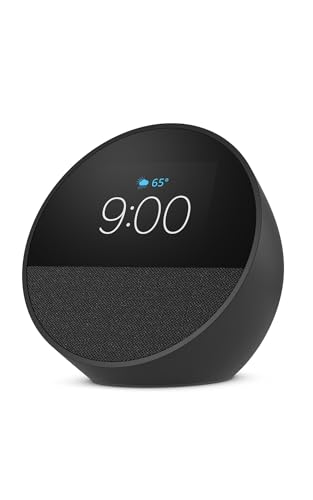
See the DecisionScore methodology →- Semi‑circular color display for time, weather and glances
- Customisable clock faces and animated backgrounds
- Rich sound in a compact form with downward‑firing driver
Find your perfect smart displays for every home
5 quick questions. No quiz-takes-10-minutes trap. A personalized match from 29 scored picks — with clear reasoning for every recommendation.
Which smart‑assistant ecosystem or platform do you prefer?
Different smart displays run on different ecosystems. Alexa devices integrate tightly with Amazon services, Google Assistant devices work with Gmail and YouTube, while other platforms include Meta’s Portal and digital frames that rely on their own apps. If you don’t care, pick 'other'.
- Alexa displays work best with Amazon smart plugs, lights, and Ring cameras.
- Google Assistant displays integrate tightly with Google Photos and Nest devices.
- Other platforms may lack voice control or require separate apps for setup.
As an Amazon Associate and affiliate partner we earn from qualifying purchases. Links on this page may earn us a commission at no extra cost to you. Full disclosure
Not ready for the quiz? Here are our overall top picks
These are our top-rated picks overall. For a recommendation matched to YOUR specific needs,
Amazon Echo Spot (newest model), Great for nightstands, offices and kitchens,
Semi‑circular color display for time, weather and glances
View Today's Price
All-in-one Smart Display Built-in Li-Battery|Google Digital Calendar,Picture
10‑inch 1080p touchscreen with bamboo back
View Today's Price
Amazon Echo Show 5 (newest model), Smart display, Designed for Alexa+, 2x the
Compact 5.5‑inch display ideal for nightstands
View Today's PriceHow to Choose the Right Smart Displays for Every Home
Choosing the right smart display depends on your preferred ecosystem, room size, installation style, and privacy needs—trade-offs that shift based on your home setup and daily habits. A feature that’s perfect for a kitchen TV could be a privacy risk in a bedroom, or simply overkill for a desk. Our recommendation engine evaluates your specific needs across five key dimensions and matches you to the right smart display in under 60 seconds.
About this guide
Smart Displays for Every Home
Why Smart Display Decisions Are Trickier Than They Look
Picking the right smart display in 2026 is a balancing act most people underestimate. You’re not just choosing between a bedside clock and a kitchen TV—smart displays come in screen sizes ranging from compact 4-inch alarms to massive 27-inch kitchen boards, each with trade-offs in clarity, footprint, and price. Amazon’s Echo Show 21 ($400) and Echo Show 15 ($250) deliver premium video calls and Alexa integration, but these smart displays require wall-mounting and ecosystem lock-in. Google’s Nest Hub Max ($230) shines as a photo frame and smart home hub, yet its OLED smart display can look washed out in bright rooms. Many buyers focus too much on camera megapixels or speaker wattage, overlooking smart display ecosystem compatibility and installation needs. Privacy is another landmine—built-in cameras on smart displays are a non-starter for bedrooms, while motion sensors spark debate about surveillance. The biggest mistake? Overpaying for smart display features you’ll never use, like advanced sleep tracking or Dolby Vision, or buying a smart display that doesn’t fit your room or platform. Navigating all these smart display variables is tougher than most realize.
What Actually Sets Smart Displays Apart in 2026
The real differences between smart displays come down to platform, display tech, and installation flexibility. Amazon dominates the smart display market with its Alexa-powered Echo Show line, offering everything from the compact Show 5 smart display to the wall-mountable 21-inch Show 21—great for Alexa-centric homes but a dead end if you run Google Home. Google’s Nest Hub Max is the go-to smart display for privacy controls and seamless photo displays, but its OLED panel struggles in direct sunlight and the camera can’t auto-frame as smoothly as Amazon’s 13MP smart display solution. LG’s XBOOM WK9 brings Dolby Vision and strong audio to the smart display category, but is bulkier and less versatile for wall mounting. Skip sub-$150 smart displays unless you only need a basic clock or photo frame—720p displays look blurry on anything larger than 8 inches. Prioritize 2K+ resolution for 10-inch and up smart displays, and only pay extra for auto-framing cameras if you make frequent video calls. Don’t get distracted by speaker specs; most built-in audio on smart displays is mediocre and benefits from a soundbar. Mount type and ecosystem matter more than raw specs when choosing a smart display.
How to Choose: Decision Factors That Interact
Room size, platform loyalty, and installation type all interact to shape your smart display options. For example, a 21-inch Echo Show smart display is overkill for a bedside table but perfect as a kitchen TV, while Google’s Nest Hub Max smart display fits best in open living spaces where its camera and photo features shine. Budget is a hard constraint: under $200 means smaller smart display screens and basic cameras, while $250–$400 unlocks premium smart display features like wall mounting and advanced sensors. Privacy concerns may rule out any camera-equipped smart display for bedrooms or kids’ rooms. Our quiz weighs your preferred smart display ecosystem, intended room, install type, primary use, and camera needs to pinpoint your best fit. The key is matching smart display screen size and feature set to your real-world space and habits, not just chasing the newest or biggest smart display model. Always consider how your smart home devices, lighting, and privacy preferences will impact daily use—these smart display factors are more important than most buyers realize.
Buyer's guide
How to choose
1Core Performance Criteria
- Choose at least 2K resolution for screens 10 inches or larger, as 720p displays look noticeably blurry for calendars and photos.
- OLED panels like those on Echo Show 21 and Nest Hub Max offer deep blacks, but can look washed out in bright, sunlit rooms.
- Prioritize high-quality microphones and 13MP+ cameras for frequent video calls, especially if you want reliable auto-framing.
- Speaker wattage and clarity matter for music, but most built-in speakers distort at high volumes—consider pairing with a soundbar.
- Look for fast, responsive touch controls and refresh rates of 120Hz or higher for smooth navigation and gaming features.
- Integrated voice assistants (Alexa or Google Assistant) should match your existing smart home devices for seamless control and automation.
2Build Quality and Durability
- Premium models like the Echo Show 21 use sturdy frames and glass, while budget models often rely on plastic that scratches easily.
- Wall-mountable displays require reinforced mounting points; test stability before installation, especially with heavier 15- to 21-inch units.
- Buttons and physical controls should feel solid—flimsy volume or mute switches are common weak points on sub-$150 models.
- Check for removable power cables and accessible ports, as these make repairs and repositioning much easier over time.
- Touchscreen responsiveness can degrade on cheaper displays after heavy use, so invest in models with proven panel durability.
- Look for models with replaceable stands or mounts, since fixed stands can break and limit your placement options.
3Value and Price Analysis
- The $200–$300 range is the sweet spot for 15-inch displays like Echo Show 15, balancing features and screen size without premium bloat.
- Premium models over $400, such as Echo Show 21, only make sense if you need a wall-mount TV replacement or advanced video calling.
- Avoid sub-$150 displays unless you’re fine with basic audio, 720p screens, and weak cameras—these are best for secondary rooms.
- Watch for seasonal price drops of 10–15% as OLED panels become more affordable and new models launch each year.
- Factor in the cost of accessories like wall mounts or privacy covers, which are often not included with mid- and high-end models.
- Don’t pay extra for features like Dolby Vision or advanced sleep tracking unless you’ll use them daily—most buyers never do.
4Use-Case Fit and Room Placement
- Bedside tables call for compact 4- to 8-inch displays with no camera or basic sensors for privacy and alarm functionality.
- Kitchen or living room setups benefit from 10- to 21-inch screens, especially for video calls, streaming, or smart home dashboards.
- Wall-mounted models like Echo Show 21 require a dedicated spot and VESA-compatible hardware, which isn’t always included.
- Photo frame use is best served by Google Nest Hub Max or Netgear Meural Canvas, both offering strong display and slideshow features.
- Entertainment appliances with Fire TV integration are ideal for users wanting a display that doubles as a streaming hub.
- If you move the display between rooms, prioritize portable models with built-in batteries and lightweight construction.
5Common Mistakes and Pitfalls
- Buying a Google Nest Hub for an Alexa household leads to frustrating compatibility gaps with 70% of smart devices and routines.
- Ignoring mount requirements—Echo Show 21 needs a VESA wall mount, and many large displays perform poorly on basic stands.
- Choosing a large screen with only 720p resolution results in blurry text and images, especially for calendars and video calls.
- Assuming all smart displays have strong speakers—most distort at high volumes and need external audio for music or movies.
- Overlooking privacy: avoid camera-equipped models in bedrooms or kids’ rooms unless you’re comfortable with active mics and sensors.
- Failing to test display brightness in your actual room can lead to OLED panels looking washed out in direct sunlight.
6Maintenance and Longevity
- Regularly update firmware to patch security flaws and improve features, especially for Alexa and Google Assistant displays.
- Clean screens with microfiber cloths and gentle solution to avoid scratching sensitive OLED or glass surfaces.
- Check for stuck pixels or touchscreen dead zones annually, as these can worsen and impact usability over time.
- Replace power cables and stands as needed—third-party accessories are widely available for most major brands.
- Disable unused sensors or cameras for privacy and to reduce wear on moving parts like auto-framing lenses.
- Store or transport portable displays in padded cases to prevent drops and screen cracks, especially for models with thin bezels.
FAQ
Frequently asked questions
Is it worth paying extra for a wall-mountable smart display like the Echo Show 21?
If you want a smart display that doubles as a kitchen TV or central control hub, the Echo Show 21’s wall-mount design and 21-inch screen justify the premium. However, it requires a dedicated wall space and a VESA mount (not always included). For most users, a 15-inch model like the Echo Show 15 offers nearly all the core features at a lower price and is easier to install on a countertop or wall. Only pay extra for the Show 21 if you truly need the size and mounting flexibility.
How does the Google Nest Hub Max compare to Amazon Echo Show models?
The Google Nest Hub Max excels as a digital photo frame and is deeply integrated with Google Assistant, making it ideal for users already invested in Google’s ecosystem. Its 10-inch OLED display is vibrant but can struggle with brightness in sunlit rooms. Amazon Echo Show models, especially the Show 15 and 21, offer larger screens, better camera auto-framing for video calls, and tighter Alexa integration. Choose Nest Hub Max for privacy controls and Google Photos, or Echo Show for Alexa routines and larger display options.
What screen resolution do I need for a smart display used as a calendar or photo frame?
For displays 10 inches or larger, a minimum of 2K resolution is recommended to keep text, photos, and calendar entries crisp. Older 720p models, especially those from Lenovo or early Echo Shows, look noticeably blurry at larger sizes and are not ideal for daily productivity or photo display. If you plan to use your smart display for family calendars, artwork, or as a digital frame, invest in a device with at least 1080p—ideally 2K—for the best experience.
Do I need a smart display with an auto-framing camera for video calls?
Auto-framing cameras, like the 13MP sensor on the Echo Show 21, are a major upgrade if you make frequent video calls and want the camera to follow you as you move. This feature keeps you centered and in focus, which is especially useful for group calls or hands-free kitchen chats. If you rarely use video calls or have privacy concerns, a standard 5MP camera or even a camera-free model will suffice and may be preferable for bedrooms or private spaces.
Are LG XBOOM or Lenovo smart displays good alternatives to Amazon and Google?
LG XBOOM smart displays, such as the WK9, stand out for their Dolby Vision support and strong audio performance, making them a solid choice for music lovers or those wanting vivid visuals. Lenovo’s Smart Display 10 is a budget-friendly pick with Google Assistant integration, but its 720p resolution and basic speakers are best suited for secondary rooms or casual use. Both brands offer decent alternatives, but Amazon and Google still lead for ecosystem features and software updates.
What’s the best smart display for privacy-conscious buyers?
If privacy is a top concern, look for smart displays with physical camera shutters, mute switches, and the option to disable microphones and sensors. Google’s Nest Hub Max offers robust privacy controls, and many newer models from both Amazon and Google include hardware switches to block cameras and mics. For bedrooms or kids’ rooms, consider camera-free models or digital frames with no microphone. Always review privacy settings and keep firmware updated to minimize risks.
How do I avoid overpaying for features I won’t use?
Start by identifying your primary use case—video calls, smart home control, photo display, or streaming. Skip premium models with advanced sensors, Dolby Vision, or wall-mount kits unless you’ll use those features daily. The $200–$300 range covers most needs with solid display quality, voice assistant integration, and decent cameras. Only invest in premium options if you require large screens, advanced video calling, or want a display to double as a TV. Otherwise, mid-range models deliver the best value.
Best Smart Displays for Every Home By Category
Related Guides
Automatic Pet Feeders
Matched to your pet’s food type, number of pets, feeding schedule, and the features you’ll actually use.
Upgrade Your Home Security with DIY Smart Products
We match you to the right cameras, locks, doorbells, and Wi-Fi—based on your home, tech comfort, budget, and security priorities.
Top Products to Make Your Home More Energy Efficient
Matches you to smart thermostats, ACs, and appliances based on your climate, home type, budget, and comfort with tech.
Home Security Cameras
Mounting, power, resolution, storage, and smart features—get a security camera matched to your home, habits, and privacy needs.
Home Weather Stations
Matched to your climate, installation site, data needs, and how serious you are about weather tracking.