Skip the research trap. Get your beginner studio monitor speakers in 60 seconds.
We scored 300+ beginner studio monitor speakers across 5 dimensions — answer 5 quick questions and we'll match you to YOUR best pick.
Powered by DecisionScore™
Each product is evaluated across 18 weighted criteria — covering performance, value, build quality, and real-world usability. Your quiz answers re-weight the criteria to match what matters most to you, so two people can get different #1 picks from the same data.
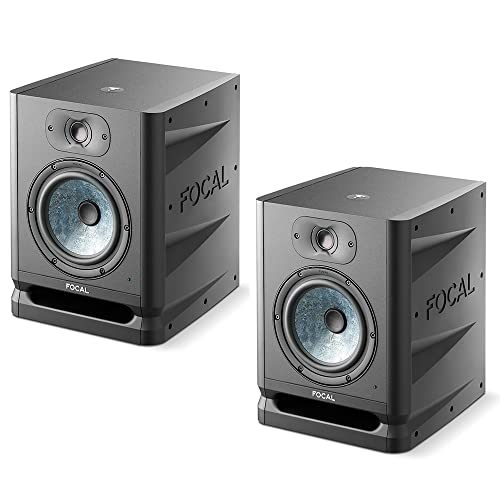
See the DecisionScore methodology →- 6.5-inch Slatefiber woofer and 1-inch inverted tweeter
- 130W bi-amp power with 40Hz low-end
- Front-firing laminar port for controlled bass
Find your perfect beginner studio monitor speakers
5 quick questions. No quiz-takes-10-minutes trap. A personalized match from 28 scored picks — with clear reasoning for every recommendation.
What is your preferred woofer size?
Woofer size affects the speaker's ability to produce low frequencies. Larger woofers generally provide better bass response, which is crucial for genres like hip-hop or electronic music. However, they may require more space.
- Measure your studio space before choosing a woofer size—oversized monitors in small rooms lead to boomy, inaccurate bass.
- Small rooms and desktops work best with 3–5 inch drivers, while medium rooms benefit from 6–7 inch models.
- If your room is untreated, avoid 8-inch monitors to prevent overwhelming low-end and muddy mixes.
As an Amazon Associate and affiliate partner we earn from qualifying purchases. Links on this page may earn us a commission at no extra cost to you. Full disclosure
Not ready for the quiz? Here are our overall top picks
These are our top-rated picks overall. For a recommendation matched to YOUR specific needs,
Focal Alpha 65 Evo
Check today’s price →6.5-inch Slatefiber woofer and 1-inch inverted tweeter
View Today's Price
Genelec 8010A
Ultra-compact aluminum monitor for portable setups
View Today's Price
IK Multimedia iLoud MTM
Coaxial MTM design with precise phase alignment
View Today's PriceHow to Choose the Right Beginner Studio Monitor Speakers
Choosing the right studio monitor speakers depends on room size, workflow, budget, and driver configuration—trade-offs that shift based on your space and mixing needs. A feature perfect for a desktop setup can be a disaster in a large, untreated room, and vice versa. Our recommendation engine evaluates your specific setup across five key dimensions and matches you to the right studio monitors in under 60 seconds.
About this guide
Beginner Studio Monitor Speakers
Why Studio Monitor Shopping Is Trickier Than It Looks
Most beginners assume any beginner studio monitor speakers will sound better than regular speakers, but the reality is far more nuanced. The main challenge is balancing room size, budget, and the kind of music you produce when choosing beginner studio monitor speakers. For example, a $150 pair like the Edifier M60 might seem tempting, but these beginner studio monitor speakers max out quickly in volume and bass extension—great for a tiny setup, but not for mixing tracks that need to translate on big systems. On the flip side, jumping to an $800 set from Genelec or Focal gives you pristine accuracy, but is overkill for untreated bedrooms if you’re just starting with beginner studio monitor speakers. The biggest mistake? Ignoring room size and buying the wrong woofer: a Yamaha HS8’s 8-inch driver will overwhelm a 100 sq ft room, while a 3-inch Mackie CR won’t cut it in a larger space if you’re relying on beginner studio monitor speakers. Frequency response, port placement (front vs. rear), and connectivity (XLR, TRS, Bluetooth, USB) all matter, but most buyers fixate on brand or price alone when shopping for beginner studio monitor speakers. Even seasoned musicians get tripped up by tuning controls—skip advanced DSP unless you’re ready to calibrate your beginner studio monitor speakers. It’s not just about specs; it’s about how those specs fit your workflow and space when selecting beginner studio monitor speakers.
What Actually Separates Entry-Level Monitors
The real differentiators in beginner studio monitor speakers are woofer size, frequency response, tuning flexibility, and input options—not flashy brand logos or marketing jargon. For instance, the Yamaha HS7 (6.5-inch woofer, ~$350/pair) delivers a flat, honest sound that exposes mix flaws—ideal for learning, but less forgiving on rough tracks if you’re using beginner studio monitor speakers. In contrast, the PreSonus Eris E7 XT offers more tuning controls and a wider sweet spot, making these beginner studio monitor speakers friendlier for imperfect rooms. Skip 8-inch models like the HS8 unless you truly need deep bass for genres like EDM or hip-hop and have a treated, medium-to-large room for your beginner studio monitor speakers. DSP and LCD EQs, as seen on KRK Rokit G4 beginner studio monitor speakers, are only worth it if you’ll actually use the calibration features; otherwise, you’re paying for complexity you won’t touch in your beginner studio monitor speakers. Don’t get distracted by Bluetooth or USB unless you need wireless streaming or direct DAW integration—balanced XLR/TRS inputs are still the standard for clean, noise-free connections on beginner studio monitor speakers. Ultimately, prioritize flat response and the right woofer size in your beginner studio monitor speakers over “fun” sound signatures or unnecessary features.
How to Choose: The Interplay of Room, Budget, and Workflow
Room size, budget, and your production workflow all interact in ways most buyers overlook when selecting beginner studio monitor speakers. A small bedroom or desktop setup demands compact 3–5 inch beginner studio monitor speakers like the Mackie CR or Edifier M60, while a medium room (120–200 sq ft) justifies stepping up to 6–7 inch beginner studio monitor speakers such as the Yamaha HS7 or PreSonus Eris E7 XT for better low-end clarity. Budget is more than just the sticker price—$300–$400 per pair is the sweet spot for accuracy and reliability in beginner studio monitor speakers, but you’ll need to factor in stands, isolation pads, and cables. Connectivity should match your interface: XLR/TRS for pro gear, RCA or Bluetooth for hybrid setups using beginner studio monitor speakers. Tuning controls only matter if you’re willing to experiment with your beginner studio monitor speakers; otherwise, basic trim is enough. Our quiz weighs your room size, sonic priorities, connectivity, tuning needs, and driver preferences to recommend the best beginner studio monitor speakers for your setup. For the best results, measure your space, think about your workflow, and don’t be swayed by reviews of consumer speakers—beginner studio monitor speakers are a different beast entirely.
Buyer's guide
How to choose
1Core Performance Criteria
- Choose a monitor with a flat frequency response for accurate mixing—Yamaha HS7 and PreSonus Eris E7 XT are standouts in this regard under $400.
- Woofer size directly affects bass extension and room suitability; 3–5 inch drivers work for desktops, while 6–7 inch models suit medium rooms.
- Front-ported monitors like KRK Rokit G4s allow closer wall placement, while rear-ported models need more space to avoid muddy bass.
- Look for power ratings above 40W per speaker for sufficient headroom in small to medium rooms; Edifier M60s are best for nearfield, not large spaces.
- A wide sweet spot, as found in the Eris E7 XT, helps maintain stereo imaging even if you move slightly off-center during sessions.
- Avoid monitors with hyped bass or treble unless you’re producing genre-specific music—neutrality is more important for mixes that translate.
2Build Quality and Durability
- Monitors in the $300–$400 range, like Yamaha HS7 and PreSonus Eris E7 XT, offer noticeably sturdier cabinets and better component longevity than sub-$200 models.
- Look for solid MDF enclosures and metal-reinforced baffles; plastic cabinets, common in budget monitors, are more prone to unwanted resonance and vibration.
- Check for reliable input jacks—balanced XLR/TRS connectors are less likely to develop crackle or signal loss over time compared to unbalanced RCA.
- Heat dissipation matters: larger monitors with built-in amplifiers (HS8, Eris E7 XT) should have adequate venting to prevent thermal shutdown during long sessions.
- Knobs and switches should feel firm and responsive; loose or wobbly controls are a red flag for long-term reliability.
- User-replaceable fuses and accessible rear panels make future repairs or upgrades easier, especially for monitors you plan to keep for years.
3Value Analysis
- The $300–$400 price tier (HS7, Eris E7 XT) offers the best balance of accuracy, power, and build—below $200, you sacrifice mix translation and dynamic range.
- Premium models like Genelec and Focal deliver incremental improvements in clarity, but diminishing returns for beginners unless your room is professionally treated.
- Edifier M60 and Mackie CR are budget-friendly for desktop setups, but lack the headroom and neutrality needed for serious mixing in larger spaces.
- KRK Rokit G4 series offers advanced DSP and LCD EQ, but only pay for these features if you’ll use room calibration regularly.
- Buying a pair is essential for stereo imaging—never buy single monitors, as it ruins the ability to judge panning and space.
- Factor in the cost of stands, isolation pads, and cables—these can add $50–$100 to your total but make a real difference in sound quality.
4Use-Case Fit
- Small rooms under 120 sq ft benefit most from 3–5 inch drivers; larger woofers like the HS8 can cause excessive bass and muddiness.
- Medium rooms (120–200 sq ft) are ideal for 6–7 inch monitors such as the Yamaha HS7 or PreSonus Eris E7 XT, balancing clarity and low-end.
- If you produce bass-heavy genres, consider an 8-inch model only if your room is treated and you have space to position them away from walls.
- Desktop setups should prioritize compact monitors like the Edifier M60, as larger speakers will overwhelm the listening position and reflect off nearby surfaces.
- Bluetooth or USB connectivity is only essential if you want to stream directly from devices or integrate with a computer without an audio interface.
- Prioritize monitors with a wide sweet spot if you move around while mixing or collaborate with others in the room.
5Common Mistakes to Avoid
- Don’t ignore room size—using 8-inch monitors in a small space will create boomy, inaccurate bass and mask mix details.
- Avoid buying single monitors; always get a matched pair for true stereo imaging and accurate panning decisions.
- Don’t chase hyped bass or treble—flat response is critical for mixes that sound good on all playback systems.
- Skipping isolation pads or stands leads to 20–30% muddier sound, as vibrations from the desk or shelf color your mix.
- Relying on consumer speaker reviews is a mistake—studio monitors are designed for accuracy, not entertainment or casual listening.
- Forgetting to budget for cables and accessories can lead to frustrating setup delays and unexpected costs.
6Maintenance and Longevity
- Keep monitors dust-free using covers when not in use; dust buildup can affect driver movement and cooling over time.
- Check and tighten input jacks and power cables periodically to prevent signal loss or intermittent crackle.
- Allow monitors to warm up for a few minutes before critical listening—amplifiers and drivers stabilize for more consistent performance.
- Avoid stacking items on top of your monitors, as this can stress cabinet joints and reduce lifespan.
- If using rear-ported monitors, maintain at least 6 inches of clearance from the wall to prevent overheating and bass buildup.
- Replace fuses or power supplies with manufacturer-approved parts only—generic replacements can compromise safety and sound quality.
FAQ
Frequently asked questions
Is it worth paying extra for DSP and LCD EQ controls in beginner monitors?
DSP and LCD EQ controls, like those found in the KRK Rokit G4 series, add value if you’re willing to calibrate your room and experiment with tuning. However, for most beginners, these features often go unused. Unless your space has real acoustic challenges or you plan to move monitors frequently, you’re better off investing in models with reliable basic trim controls and spending the difference on isolation pads or acoustic treatment.
How does the Yamaha HS7 compare to the PreSonus Eris E7 XT for new producers?
The Yamaha HS7 offers a flatter, more unforgiving response—great for learning mix fundamentals and catching mistakes, but it can sound harsh on poorly mixed tracks. The PreSonus Eris E7 XT has more flexible tuning controls and a wider sweet spot, making it friendlier for untreated rooms or collaborative setups. Both excel in the $300–$400 range, but the Eris is slightly more forgiving if your space isn’t acoustically perfect.
What size woofer do I need for a small bedroom studio?
For bedrooms under 120 square feet, stick to monitors with 3–5 inch woofers. Larger drivers, like those in the Yamaha HS8, will create excessive bass and mask mix details in small spaces. Models like the Mackie CR or Edifier M60 are ideal for desktops and compact rooms, providing clear mids and highs without overwhelming your workspace.
Are Bluetooth-enabled studio monitors good for serious mixing?
Bluetooth-enabled monitors, such as some Edifier models, offer convenience for casual listening or reference checks from your phone. However, Bluetooth introduces latency and potential compression artifacts, making it unsuitable for critical mixing. For serious production, prioritize balanced XLR or TRS inputs to ensure the cleanest, most accurate signal path from your audio interface.
Do I need to buy accessories like isolation pads and stands?
Absolutely—accessories like isolation pads and stands are not optional if you want accurate monitoring. Expert tests show that placing monitors directly on a desk muddies the sound by up to 30%. Stands position the speakers at ear level, while pads reduce vibrations that color your mix. Budget an extra $50–$100 for these essentials.
How does the Edifier M60 compare to more expensive monitors for desktop setups?
The Edifier M60 is a solid choice for desktop setups under $200, delivering balanced sound at moderate volumes. However, it lacks the headroom, bass extension, and flat response of pricier models like the Yamaha HS7 or PreSonus Eris E7 XT. If you’re mixing professionally or want your tracks to translate everywhere, consider stepping up to the $300–$400 range.
Can I use consumer speakers or party speakers for mixing instead of studio monitors?
Consumer and party speakers, such as JBL party models, are designed for entertainment and often exaggerate bass and treble. This coloration makes it nearly impossible to create mixes that sound good on other systems. Studio monitors, like the Yamaha HS7 or PreSonus Eris E7 XT, are engineered for flat, neutral response—essential for accurate, reliable mixing results.
Related Guides
Acoustic Panels
Room type, frequency issues, installation, and budget—get matched to the right acoustic panels for your space and sound goals.
Audio Interfaces
Matched to your workflow, input needs, computer ports, and how critical low-latency performance is for your sessions.
Digital Audio Recorders
Matched to your recording style, mic setup, budget, and portability needs—get the right audio recorder for your workflow.
Field Recorders
Matched to your skill level, channel needs, budget, and whether you’ll use it for music, film, or fieldwork.
Professional Studio Headphones
Matched to your workflow, budget, comfort, and whether you need isolation for tracking or accuracy for mixing.