Skip the research trap. Get your gaming routers in 60 seconds.
We scored 250+ gaming routers across 5 dimensions — answer 5 quick questions and we'll match you to YOUR best pick.
Powered by DecisionScore™
Each product is evaluated across 18 weighted criteria — covering performance, value, build quality, and real-world usability. Your quiz answers re-weight the criteria to match what matters most to you, so two people can get different #1 picks from the same data.
See the DecisionScore methodology →- AX6000 dual-band Wi-Fi 6 up to 6 Gbps
- 1x 2.5G WAN plus 4x Gigabit LAN ports
- MU-MIMO and OFDMA for 60+ simultaneous devices
Find your perfect gaming routers
5 quick questions. No quiz-takes-10-minutes trap. A personalized match from 23 scored picks — with clear reasoning for every recommendation.
Which Wi-Fi standard do you need?
Wi-Fi 6 (802.11ax) is the current sweet spot offering excellent speed and low latency. Wi-Fi 6E adds a dedicated 6 GHz band for even less interference in crowded areas. Dual-band routers are simpler; tri-band adds an extra band for more bandwidth.
- Wi-Fi 6 is compatible with nearly all modern devices and offers excellent speed for gaming.
- Wi-Fi 6E adds a 6 GHz band, reducing interference in crowded neighborhoods or apartments.
- Wi-Fi 7 is only worth it if your gaming PC or console supports the new standard—otherwise, stick with 6E or 6.
As an Amazon Associate and affiliate partner we earn from qualifying purchases. Links on this page may earn us a commission at no extra cost to you. Full disclosure
Not ready for the quiz? Here are our overall top picks
These are our top-rated picks overall. For a recommendation matched to YOUR specific needs,
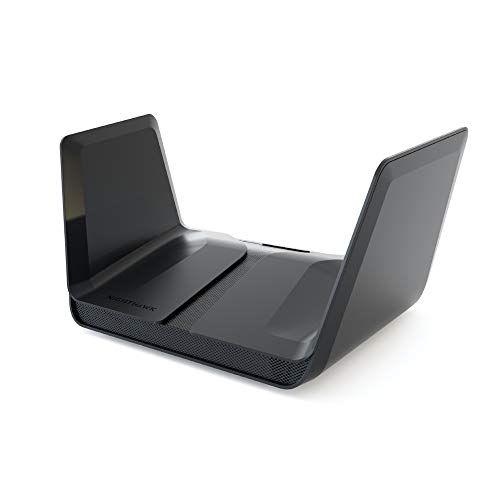
NETGEAR Nighthawk 8-Stream AX8 WiFi 6 Router (RAX80) – AX6000 Wireless Speed (Up
AX6000 dual-band Wi-Fi 6 up to 6 Gbps
View Today's Price
NETGEAR Nighthawk Pro Gaming 6-Stream WiFi 6 Router (XR1000) - Security
AX5400 Wi-Fi 6 with DumaOS 3.0 gaming OS
View Today's Price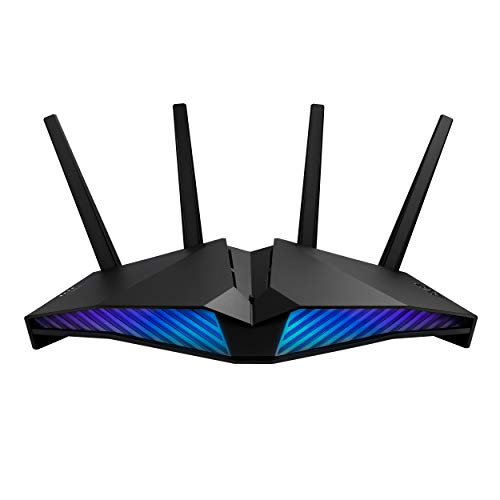
ASUS RT-AX82U (AX5400) Dual Band WiFi 6 Extendable Gaming Router, Gaming Port,
AX5400 dual-band Wi-Fi 6 in military-grade chassis
View Today's PriceHow to Choose the Right Gaming Routers
Choosing the right gaming router depends on Wi-Fi standard, home size, device load, platform, and budget—trade-offs that shift based on your setup. A feature that’s essential for a large, multi-gamer household is wasted in a small apartment, and the priciest Wi-Fi 7 router won’t help if your devices can’t use it. Our recommendation engine evaluates your specific needs across 15+ dimensions and matches you to the best-fit gaming router in under 60 seconds.
About this guide
Gaming Routers
Why Gaming Routers Are a Real Upgrade—And a Real Challenge
Choosing the right gaming router in 2026 is trickier than it looks. The market is flooded with gaming routers claiming 'gaming' status, but only a handful of gaming routers actually deliver on ultra-low latency and stable connections when your network is under real-world stress. You’re not just picking between Wi-Fi 6, 6E, or Wi-Fi 7 gaming routers; you’re weighing features like OFDMA, MU-MIMO, and advanced QoS algorithms that can make or break your ping during a tournament. Price tiers matter: $100–$150 gets you solid dual-band Wi-Fi 6 gaming routers, but you’ll miss out on 6 GHz bands and multi-gig ports found in $250–$900 gaming routers like the Asus ROG Rapture GT-BE19000AI. Many buyers overpay for raw wireless speed in gaming routers, forgetting that a wired 2.5G/10G port is far more impactful for competitive PC gaming. Others grab flashy RGB gaming routers with 'gamer' branding but lack the right QoS or mesh support for large homes. The most common mistake? Ignoring your actual device mix and home size—leading to dead zones or wasted bandwidth with gaming routers that don’t fit your needs. Every spec and dollar counts for gaming routers.
What Really Sets Gaming Routers Apart in 2026
Not all gaming routers are created equal, and the differences aren’t always obvious from the box. Wi-Fi 7 gaming routers like the Asus ROG Rapture GT-BE19000AI and TP-Link Archer GE650 dominate expert picks for their warp speeds, low-latency design, and multi-gig ports—but these gaming routers are overkill if your devices don’t support Wi-Fi 7 yet. Wi-Fi 6E gaming routers (like Asus GT-AXE11000) are a sweet spot for many, offering 6 GHz bands for less congestion at a lower price. Skip tri-band gaming routers unless you have dozens of devices or a large, multi-story home. Prioritize gaming routers with robust QoS (Asus Adaptive QoS, TP-Link Game Accelerator, or Netgear DumaOS) that can actually detect and prioritize game traffic. Multi-gig wired ports (2.5G/10G) in gaming routers matter more for low ping than chasing theoretical Wi-Fi speeds. Mesh-compatible gaming routers are a must for homes over 2,500 sq ft—single-unit gaming routers, even expensive ones, will leave dead zones. Don’t get distracted by RGB lights or 'gamer' dashboards on gaming routers unless you need them; focus on real performance features that set gaming routers apart.
Decision Factors: How to Find Your Perfect Match
Your ideal gaming router depends on how your home size, device count, gaming platform, and budget interact. A large home demands mesh gaming routers or strong antennas—no single gaming router, not even a $900 flagship, can cover 3,000+ sq ft alone. Heavy device loads (30+ devices) require MU-MIMO and OFDMA in gaming routers for consistent ping, while wired PC gamers should focus on gaming routers with multi-gig LAN ports and proven QoS. Console and mobile gamers need strong 5 GHz or 6 GHz wireless from gaming routers, but don’t benefit from extra bands if their devices can’t use them. Your budget shapes what’s realistic: $100–$150 covers most Wi-Fi 6 gaming routers, but $200–$400 unlocks multi-gig ports, tri-band, and advanced gaming features in higher-end gaming routers. The quiz evaluates your Wi-Fi standard, home size, gaming platform, device load, and budget to personalize your shortlist of gaming routers. Beyond that, consider your ISP’s compatibility (Xfinity users need TP-Link BE900/BE550 gaming routers for 2.5G+), and don’t underestimate the complexity of setup—some Asus and TP-Link gaming routers require tweaking to unlock their full gaming potential. Prioritize features in gaming routers that match your real usage, not just the latest buzzwords.
Buyer's guide
How to choose
1Core Performance Criteria
- Look for Wi-Fi 7 or Wi-Fi 6E if you want true multi-gig wireless speeds and future-proofing for new gaming devices in 2026.
- Prioritize routers with 2.5G or 10G LAN ports—wired connections consistently deliver the lowest ping for competitive PC gaming.
- Advanced QoS is a must; Asus Adaptive QoS, TP-Link Game Accelerator, or Netgear DumaOS actually detect and prioritize gaming traffic.
- OFDMA and MU-MIMO support are essential for keeping latency low when multiple devices are streaming or gaming at the same time.
- Tri-band routers are only worth it if you have 30+ devices or need a dedicated 6 GHz band for congestion-free wireless gaming.
- Don’t chase theoretical Wi-Fi speeds—real-world gaming rarely exceeds 1–2Gbps, even on the fastest routers available today.
2Build Quality and Durability
- Asus ROG and TP-Link Archer models use premium chipsets and heat sinks, which help prevent throttling during long gaming sessions.
- Routers in the $250–$900 range feature sturdier antennas and better cooling, reducing the risk of overheating or signal dropouts.
- Netgear Nighthawk Pro Gaming routers are praised for robust build quality and slim designs that fit easily in tight spaces.
- Avoid ultra-budget models with flimsy plastic cases—these often suffer from poor thermal management and shorter component lifespan.
- Check for replaceable antennas and modular designs, which make it easier to upgrade or repair your router if needed.
- Warranty terms matter: Asus and TP-Link typically offer two years, while some cheaper brands provide only 12 months of coverage.
3Value and Price Analysis
- The sweet spot for most gamers is $250–$400, where you get multi-gig ports, advanced QoS, and 2,000+ sq ft of coverage.
- Wi-Fi 7 flagships like the GT-BE19000AI cost $900, but most buyers won’t benefit unless they have top-tier fiber and Wi-Fi 7 devices.
- Mid-range Wi-Fi 7 and 6E routers like TP-Link GE650 or Asus RT-AX86U deliver 90% of the performance at a fraction of the price.
- Budget routers under $150 are fine for small homes and light device loads, but lack future-proofing and advanced traffic management.
- Don’t overpay for features like RGB lighting or complex dashboards unless you truly want them—they add little to actual gaming performance.
- Watch for price drops on last year’s Wi-Fi 6E models—these often undercut new Wi-Fi 7 routers while offering nearly identical speeds.
4Use-Case Fit and Platform Compatibility
- PC gamers should always prioritize routers with dedicated gaming LAN ports and proven QoS for the lowest possible ping.
- Console gamers on PS5/Xbox benefit from strong 5 GHz or 6 GHz wireless, but don’t need tri-band unless the home is crowded.
- Large homes (2,500+ sq ft) require mesh support or AiMesh-compatible routers—single units, even expensive ones, can’t cover every room.
- Xfinity and fiber users should check for 2.5G/10G WAN compatibility, as many routers still max out at 1Gbps input speeds.
- Mobile and cross-platform households need MU-MIMO and OFDMA to keep latency low across many simultaneous wireless connections.
- Skip Wi-Fi 7 if your gaming devices only support Wi-Fi 6 or 6E—real-world gains are minimal without matching client hardware.
5Common Mistakes and Pitfalls
- Many buyers ignore their home size and end up with dead zones—always match router coverage and mesh support to your square footage.
- Overpaying for Wi-Fi 7 or tri-band routers is common if your devices can’t use the extra bands or bandwidth.
- Failing to enable gaming QoS after setup leaves your gaming packets fighting with streaming traffic, causing unnecessary lag spikes.
- Assuming all 'gaming routers' have advanced QoS or multi-gig ports—many budget models only offer basic features under the hood.
- Buying based on flashy RGB or 'gamer' branding instead of real performance specs leads to disappointment in competitive play.
- Neglecting ISP compatibility, especially for Xfinity or fiber, can bottleneck your speeds even on high-end routers like the BE900.
6Maintenance and Longevity
- Update firmware regularly—Asus and TP-Link push frequent updates that patch vulnerabilities and improve gaming features over time.
- Keep your router in a ventilated area to prevent overheating, especially with high-performance models that run hot under load.
- Check for ongoing security support; premium brands often provide updates for 3–5 years, while budget models may stop after 12 months.
- Dust and clean antennas and vents every few months to maintain optimal signal strength and prevent thermal throttling.
- Monitor for signal drops or overheating during long gaming sessions—persistent issues may indicate failing hardware or poor thermal design.
- Consider future-proofing: routers with modular antennas and multi-gig ports are more likely to stay relevant as your network needs grow.
FAQ
Frequently asked questions
Is Wi-Fi 7 worth paying extra for in a gaming router?
Wi-Fi 7 routers like the Asus ROG Rapture GT-BE19000AI deliver warp speeds and extremely low latency, but only if your gaming devices support Wi-Fi 7. For most users in 2026, the real gains come from multi-gig ports and advanced QoS, not just the wireless standard. If you have a fiber connection and the latest gaming PCs or consoles, Wi-Fi 7 is worth the investment. Otherwise, a high-end Wi-Fi 6E model offers nearly identical gaming performance for less money.
How does the Asus RT-AX86U compare to the TP-Link Archer GE650 for gaming?
The Asus RT-AX86U is a top dual-purpose Wi-Fi 6 router with strong close-range speeds, a dedicated 2.5G gaming port, and proven Adaptive QoS. The TP-Link Archer GE650, a Wi-Fi 7 model, offers faster wireless, RGB lighting, and low-latency design at a similar price point ($200–$250). If you have Wi-Fi 7 devices or want future-proofing, choose the GE650. For most current consoles and PCs, the RT-AX86U remains a reliable, value-packed pick.
What Wi-Fi standard do I need for PS5 or Xbox gaming in 2026?
Most PS5 and Xbox Series X users will get excellent results with Wi-Fi 6 or Wi-Fi 6E routers. These consoles don’t yet support Wi-Fi 7, so paying extra for a Wi-Fi 7 router won’t improve your gaming experience. Focus on strong 5 GHz or 6 GHz performance, robust QoS, and mesh support if your home is large. Models like the Asus RT-AX86U or GT-AXE11000 are ideal for console gaming.
Do I need a tri-band router for a large home with multiple gamers?
If your home is over 2,500 sq ft and you have several gamers or 30+ connected devices, a tri-band router or mesh system is a smart investment. Tri-band models provide an extra 5 GHz or 6 GHz band, reducing congestion and keeping ping low even when the network is busy. For truly seamless coverage, consider AiMesh-compatible Asus routers or TP-Link’s mesh packs rather than relying on a single-unit router.
How important are multi-gig ports for gaming routers?
Multi-gig ports (2.5G or 10G) are crucial for competitive PC gamers who want the lowest possible latency and future-proof speeds. Wired connections through these ports consistently outperform even the fastest Wi-Fi in real-world gaming. Models like the TP-Link Archer BE900 and Asus ROG Rapture GT-BE19000AI offer these ports, ensuring your gaming PC or console always gets priority bandwidth and the lowest ping.
What’s the best value gaming router for most users in 2026?
Most buyers will find the best value in mid-range Wi-Fi 7 or Wi-Fi 6E routers priced between $200 and $300. The TP-Link Archer GE650 and Asus RT-AX86U both offer advanced QoS, multi-gig ports, and enough coverage for medium to large homes. Unless you have a top-tier fiber connection or 6E/7-enabled devices, you don’t need to spend $900 on a flagship router. Focus on real-world features and compatibility with your gaming setup.
Are Netgear Nighthawk routers still a good choice for gaming?
Netgear Nighthawk routers like the RS200 and Pro Gaming XR500 remain solid options for gamers who want reliable speed and a slim, easy-to-place design. While they may lack some of the latest Wi-Fi 7 features, their DumaOS platform offers strong QoS and geo-filtering for lag reduction. For most users, they deliver excellent performance, especially if you don’t need mesh support or multi-gig ports. Always check your device compatibility before buying.
Best Gaming Routers By Category
Related Guides
Controller Lanyards
Device compatibility, attachment style, comfort, and value—get matched to the right lanyard for your controller and gaming habits.
Enthusiast Mechanical Keyboards
Matched to your layout, switch feel, wireless needs, modding plans, and budget—get the perfect enthusiast keyboard for your workflow.
Esports Gaming Mice Bundles
Matched to your genre, budget, keyboard size, connection, and mousepad needs—get the right esports bundle for your setup.
Gaming Keyboards
Switch feel, layout, RGB, and budget—get matched to the perfect gaming keyboard for your setup and play style.