Skip the research trap. Get your digital audio recorders in 60 seconds.
We scored 350+ digital audio recorders across 5 dimensions — answer 5 quick questions and we'll match you to YOUR best pick.
Powered by DecisionScore™
Each product is evaluated across 18 weighted criteria — covering performance, value, build quality, and real-world usability. Your quiz answers re-weight the criteria to match what matters most to you, so two people can get different #1 picks from the same data.
See the DecisionScore methodology →- Built-in omnidirectional condenser microphones
- Records WAV and MP3 formats
- USB audio interface mode
Find your perfect digital audio recorders
5 quick questions. No quiz-takes-10-minutes trap. A personalized match from 33 scored picks — with clear reasoning for every recommendation.
What is your primary recording use case?
Your use case determines which features matter most — from XLR inputs for podcasting to ultra-compact design for lectures.
- If you mostly do interviews or podcasts, prioritize XLR inputs and USB audio interface support.
- Field recording requires robust build, long battery life, and high-quality built-in mics.
- Music and live performance benefit from multi-track support and 32-bit float for dynamic range.
As an Amazon Associate and affiliate partner we earn from qualifying purchases. Links on this page may earn us a commission at no extra cost to you. Full disclosure
Not ready for the quiz? Here are our overall top picks
These are our top-rated picks overall. For a recommendation matched to YOUR specific needs,
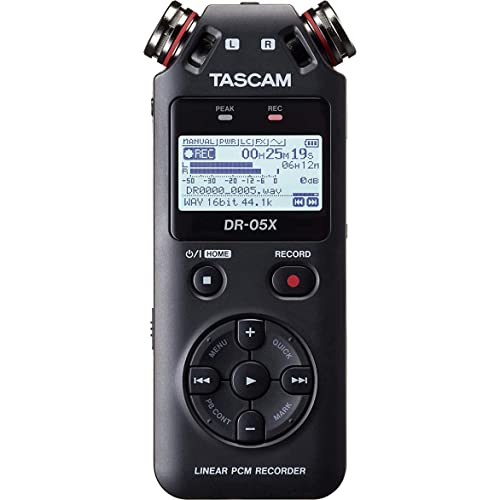
Tascam DR-05X Stereo Handheld Digital Audio Portable Recorder and USB Audio
Built-in omnidirectional condenser microphones
View Today's Price
Sony ICD-UX570 Series Digital Voice Recorder (Black) with Built-in USB Bundle
OLED display showing remaining recording time
View Today's Price
TASCAM DR-05XP 32-Bit Float Portable Handheld Field Recorder and USB-C Audio
32-bit float / 24-bit / 16-bit flexible recording modes
View Today's PriceHow to Choose the Right Digital Audio Recorders
Choosing the right digital audio recorder depends on your recording use case, input needs, budget, and portability—trade-offs that shift based on your workflow and gear preferences. A feature that’s perfect for field recording might be overkill (or even a hindrance) for podcasting or lectures. Generic top-10 lists can’t account for these nuanced interactions. Our recommendation engine evaluates your unique situation across five dimensions and matches you to the best-fit recorder in under 60 seconds.
About this guide
Digital Audio Recorders
Why Choosing the Right Digital Audio Recorder Is Tricky
Picking the ideal digital audio recorder in 2026 is more nuanced than most buyers realize. You’re not just choosing between pocket-sized digital audio recorders for voice and multi-track field rigs—you’re juggling trade-offs in bit depth, input flexibility, and real-world usability. For example, a $100 Sony ICD-PX series digital audio recorder is unbeatable for interviews but lacks XLR inputs and 32-bit float, making it a poor fit for music or podcasting. Step up to a $250 Zoom H5 or a $350 Zoom H6 digital audio recorder, and you get 4–6 tracks, XLR/TRS combo jacks, and 32-bit float, but at the cost of portability and battery life. Many buyers fixate on maximum sample rates (like 192kHz) or track counts in digital audio recorders, overlooking the importance of preamp quality and USB audio interface support. Others assume all XLR-equipped digital audio recorders supply phantom power to every input—often not true on budget models. The most common mistake? Underestimating how your use case (field, studio, podcast, or lecture) dictates which features in digital audio recorders are actually essential. The wrong match leads to frustration, workflow bottlenecks, or wasted money.
What Really Sets Digital Audio Recorders Apart in 2026
The true differentiators among digital audio recorders this year aren’t just flashy specs—they’re the technologies and design choices that solve real recording headaches. 32-bit float recording, now standard on Zoom’s H4essential and H6essential digital audio recorders, is a significant upgrade for unpredictable sound levels, letting you forget about clipping and gain staging. Tascam’s DR and Portacapture digital audio recorders stand out for their clean preamps and flexible form factors, while Sony’s ICD-PX series remains the go-to digital audio recorder for journalists needing instant, reliable voice capture. Skip 192kHz sample rates unless you’re mastering music—96kHz is more than enough for podcasts and field work, and higher rates eat battery and storage on digital audio recorders. Prioritize XLR/TRS combo inputs with phantom power if you use condenser mics; Behringer’s UMC404HD digital audio recorder is a budget standout with four Midas preamps, but beware of driver quirks on Windows. USB audio interface mode is essential if you want your digital audio recorder to double as a computer interface—Zoom and Tascam both excel here. Don’t chase track count unless you’re recording multi-person sessions; for most users, 2–4 tracks on digital audio recorders is the sweet spot.
How to Decide: Interactions and Real-World Trade-Offs
Your ideal digital audio recorder depends on how your needs, budget, and workflow intersect. Room size and group size affect how many XLR inputs your digital audio recorder will need—solo podcasters can get by with two, but roundtable shows or band sessions demand four or more. Portability often means sacrificing input count and battery life; field digital audio recorders like the Zoom F-series or Tascam DR-70D bridge this gap, but weigh more and cost $250–$400. Budget is a hard constraint: under $100 gets you basic digital audio recorders for voice, $200–$300 unlocks 32-bit float and multi-track digital audio recorders, while $400+ is overkill for most. USB audio interface mode is non-negotiable if you want one digital audio recorder for both field and studio. Our quiz weighs your use case, input needs, budget, portability, and experience level to pinpoint your best digital audio recorder match. Beyond that, think about SD card compatibility (some Zoom digital audio recorders reject cards over 128GB), battery life for long sessions, and whether you’ll need real-time monitoring or advanced file formats. The right digital audio recorder balances all these factors, not just a single headline spec.
Buyer's guide
How to choose
1Core Performance Criteria
- 32-bit float recording, as found on Zoom H6essential and H5studio, virtually eliminates clipping and saves you from constant gain adjustments.
- Look for at least 24-bit/96kHz recording for podcasts and field work—192kHz is only necessary for high-end music mastering or archival projects.
- XLR/TRS combo inputs with phantom power are essential for condenser mics; not all budget models provide +48V on every channel.
- Built-in stereo condenser microphones (X/Y or A/B) matter for capturing natural soundscapes or interviews without external gear.
- USB audio interface mode is a must if you want your recorder to double as a computer interface for streaming or DAW integration.
- Check for real-time monitoring and low-latency performance, especially on USB interfaces like the Behringer UMC404HD or Tascam US-16x08.
2Build Quality and Durability
- Zoom’s Essential and Studio Series are known for robust chassis and tactile controls, surviving field use and daily transport without issue.
- Tascam’s DR and Portacapture models use reinforced plastic and metal jacks, reducing wear and accidental disconnects during mobile sessions.
- Sony ICD-PX recorders are ultra-light but less rugged—great for pocket use, but not ideal for rough outdoor conditions or heavy travel.
- Battery compartment design matters: field recorders with secure latches and tool-free access (like Zoom H5) are easier to maintain on the go.
- Beware of overheating on battery-powered multi-track units during long sessions; some Zoom models auto-shutdown after 2+ hours of continuous use.
- SD card slot durability is critical—flimsy doors or loose contacts can lead to mid-session failures, especially on older or budget models.
3Value Analysis and Price Tiers
- The $200–$300 range (Zoom H5, H6essential) hits the sweet spot for 4+ tracks, 32-bit float, and USB interface—premium features without pro-only bloat.
- Budget options under $100 (Sony ICD-PX) are excellent for voice and interviews, but lack XLR inputs, phantom power, and advanced recording formats.
- Behringer UMC404HD at ~$150 offers four Midas preamps and 24-bit/192kHz, but skips onboard mics and may require driver tweaks for Windows.
- Tascam US-16x08 at ~$400 is overkill for most, offering 16 XLR/TRS inputs—best for studio expansions, not portable use or solo creators.
- Expect 10–15% price drops on 2025 models after CES, especially on bundles with mics, stands, and SD cards.
- Avoid paying extra for features you won’t use, like MIDI I/O or 8+ outputs, unless you’re building a full studio setup.
4Use-Case Fit and Application
- Podcasting and interviews benefit from 2–4 XLR inputs and reliable USB audio interface mode for easy DAW integration.
- Field recording demands robust build, long battery life, and high-quality built-in mics—Zoom F-series and Tascam DR-70D excel here.
- Music production requires multi-track support, low-noise preamps, and 32-bit float for dynamic performances—Zoom H6essential is a top pick.
- Lectures and meetings are best served by ultra-compact models like Sony ICD-PX, prioritizing portability and quick startup.
- Film and video audio needs timecode sync, camera-mountable form factors, and XLR inputs—Tascam DR-70D bridges these needs effectively.
- Consider your future needs: buying a 4-track recorder now prevents outgrowing a 2-channel device as your projects expand.
5Common Mistakes and Pitfalls
- Chasing maximum sample rates (192kHz) wastes storage and battery—96kHz is sufficient for most non-mastering applications.
- Assuming all XLR-equipped recorders supply phantom power to every input—many budget models do not, limiting condenser mic compatibility.
- Overlooking USB class-compliance can lead to driver headaches on Mac/PC—Zoom and Tascam are generally reliable, but always verify.
- Ignoring SD card compatibility can halt sessions—some Zoom units reject cards over 128GB, causing mid-recording failures.
- Buying fixed 2-channel recorders limits future flexibility—opt for 4+ inputs if you anticipate group sessions or multi-mic setups.
- Neglecting battery life: field use demands 10+ hours; many multi-track units fall short, risking shutdowns during long takes.
6Maintenance, Longevity, and Upgradability
- Regularly update firmware to fix bugs and improve compatibility—Zoom and Tascam frequently release updates for recording stability.
- Clean XLR/TRS jacks and SD card slots to prevent connection issues and data loss, especially after outdoor or mobile use.
- Replace batteries with high-quality rechargeables for longer life and less waste—avoid cheap cells that can leak and damage compartments.
- Store recorders in padded cases to protect delicate mics and controls, especially for field models with exposed capsules.
- Check for modular upgrades: Zoom’s H5 and H6 support interchangeable mic capsules, extending their lifespan and versatility.
- Monitor for overheating or auto-shutdowns on older models—if frequent, consider upgrading to newer units with improved thermal management.
FAQ
Frequently asked questions
Is 32-bit float recording worth paying extra for in 2026?
Absolutely—32-bit float, now standard on Zoom H6essential and H5studio, virtually eliminates clipping and lets you recover audio even from wildly inconsistent levels. For field work, music, and unpredictable interviews, it’s a genuine workflow upgrade over 24-bit, especially if you don’t want to constantly adjust gain. If your budget allows, prioritize this feature for future-proofing.
How does Zoom compare to Tascam for portable recorders?
Zoom excels with 32-bit float across its Essential and Studio Series, offering modular mic capsules and robust USB interface modes. Tascam’s DR and Portacapture lines stand out for cleaner preamps and flexible form factors, especially for DSLR and field use. Both brands are reliable, but Zoom is better for multi-role use, while Tascam often wins on preamp quality.
What sample rate and bit depth do I need for podcasting?
For podcasting, 24-bit/96kHz is more than sufficient and widely supported by DAWs and streaming platforms. 32-bit float is a bonus for dynamic interviews, but 192kHz offers no real-world benefit for spoken word. Focus instead on preamp quality, XLR inputs, and USB audio interface support for the best podcasting workflow.
Are Behringer audio interfaces reliable for home studios?
Behringer’s UMC404HD is a top value pick for home studios, offering four Midas preamps and 24-bit/192kHz recording at a budget price. However, some users report driver instability on Windows and occasional latency issues. For Mac or simple setups, it’s a great choice, but double-check driver compatibility for your system before buying.
How many XLR inputs should I get for group recording?
If you regularly record roundtable podcasts, bands, or multi-person interviews, opt for a recorder with at least four XLR/TRS combo inputs—Zoom H6essential and Tascam US-16x08 are strong options. Two inputs work for solo or duo setups, but upgrading to four prevents outgrowing your gear as your recording ambitions expand.
What’s the best option for ultra-portable voice recording?
For maximum portability, Sony’s ICD-PX series remains unmatched in 2026. These pocket-sized recorders boot up instantly, offer long battery life, and deliver clear voice capture for interviews or lectures. They lack XLR inputs and advanced formats, but for journalists or students prioritizing size and simplicity, they’re the gold standard.
Do I need USB audio interface mode on my recorder?
If you want your recorder to double as a computer audio interface for streaming, podcasting, or DAW use, USB audio interface mode is essential. Zoom and Tascam models offer reliable, low-latency USB modes. Without this, you’ll need a separate interface, adding cost and complexity to your setup.
Best Digital Audio Recorders By Category
Related Guides
Acoustic Panels
Room type, frequency issues, installation, and budget—get matched to the right acoustic panels for your space and sound goals.
Audio Interfaces
Matched to your workflow, input needs, computer ports, and how critical low-latency performance is for your sessions.
Field Recorders
Matched to your skill level, channel needs, budget, and whether you’ll use it for music, film, or fieldwork.
Professional Studio Headphones
Matched to your workflow, budget, comfort, and whether you need isolation for tracking or accuracy for mixing.