Skip the research trap. Get your professional video switchers in 60 seconds.
We scored 300+ professional video switchers across 5 dimensions — answer 5 quick questions and we'll match you to YOUR best pick.

Powered by DecisionScore™
Each product is evaluated across 18 weighted criteria — covering performance, value, build quality, and real-world usability. Your quiz answers re-weight the criteria to match what matters most to you, so two people can get different #1 picks from the same data.
See the DecisionScore methodology →- 4 x 4K HDMI inputs for multi-camera production
- 2.1-inch on-board IPS touchscreen monitor
- Integrated PTZ camera controller (VISCA protocol)
Find your perfect professional video switchers
5 quick questions. No quiz-takes-10-minutes trap. A personalized match from 29 scored picks — with clear reasoning for every recommendation.
What input type do you primarily need?
HDMI is ideal for DSLR, mirrorless, and consumer cameras. SDI is used in professional broadcast environments where cameras are far from the switcher. Hybrid models support both.
- HDMI is compatible with most consumer cameras and laptops, making it the default for small studios or streaming setups.
- SDI is preferred for professional cameras and long cable runs, reducing signal loss and supporting multi-cam sync.
- Hybrid switchers let you mix HDMI and SDI sources, useful if you plan to upgrade or mix camera types in the future.
As an Amazon Associate and affiliate partner we earn from qualifying purchases. Links on this page may earn us a commission at no extra cost to you. Full disclosure
Not ready for the quiz? Here are our overall top picks
These are our top-rated picks overall. For a recommendation matched to YOUR specific needs,
RGBlink Mini-pro V3 Video Mixer Switcher with 4 x 4K HDMI Inputs, Dual
4 x 4K HDMI inputs for multi-camera production
View Today's Price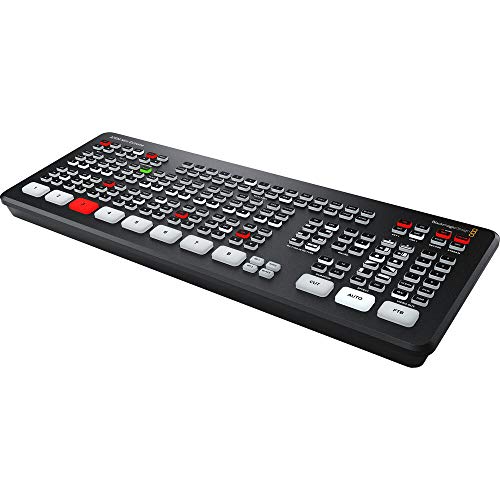
Blackmagic Design ATEM Mini Extreme HDMI Live Stream Switcher (SWATEMMINICEXT)
8 HDMI inputs with full-featured switcher
View Today's Price
Blackmagic Design ATEM Mini Pro ISO HDMI Live Stream Switcher Bundle with 6’
Records 5 separate H.264 streams simultaneously
View Today's PriceHow to Choose the Right Professional Video Switchers
Choosing the right professional video switcher depends on your input types, channel count, workflow, and budget—trade-offs that shift based on your venue, camera fleet, and streaming needs. A feature that’s perfect for a solo streamer can be a disaster for a multi-cam church setup, and vice versa. Our recommendation engine evaluates your specific needs across five key dimensions and matches you to the ideal switcher in under 60 seconds.
About this guide
Professional Video Switchers
Why Picking the Right Video Switcher Is Tricky
Choosing professional video switchers in 2026 is far more nuanced than most buyers realize. The $200–$1,500 price range for professional video switchers covers everything from barebones 4-channel HDMI mixers to robust 8-channel SDI workhorses. Many assume more channels or effects in professional video switchers are always better, but that’s not true—chasing a Roland V-8HD for its 8 HDMI inputs (at $2,800) is overkill for a solo streamer or podcast. The real pain points with professional video switchers: HDMI-only models like the ATEM Mini Pro ISO are affordable and broadly compatible, but they can’t handle long cable runs or pro-grade cameras without extra converters. SDI professional video switchers such as the Roland V-1SDI cost more but deliver rock-solid reliability and sync for large venues. Most buyers overlook input compatibility in professional video switchers—HDMI 2.0 vs. 2.1 makes or breaks 4K/60p workflows, and firmware gaps on older Roland units can cause frustrating blackouts. Don’t underestimate the hidden costs of professional video switchers: you’ll need to budget 20% extra for quality cables and converters, and cheap accessories can introduce jitter or audio sync drift. The biggest mistake with professional video switchers? Prioritizing flashy effects over ISO recording or reliable streaming.
What Actually Sets Switchers Apart in 2026
The true differentiators among professional video switchers in 2026 are input type, recording capabilities, and streaming integration—not just channel count or brand. HDMI-only professional video switchers like the FEELWORLD LIVEPRO L1 V1 are ideal for small, portable setups but fall short for pro multi-cam events due to cable length restrictions and lack of genlock. Hybrid HDMI/SDI professional video switchers, such as the Roland V-1SDI, offer the flexibility to mix consumer and broadcast cameras, which is essential for churches or sports events with distant camera runs. 4K support in professional video switchers is no longer a luxury—if your cameras output 4K/60p, avoid anything limited to HDMI 2.0 or you’ll hit bandwidth walls and blackouts, as seen in aging Roland V-series professional video switchers. Built-in ISO recording, like on the Blackmagic ATEM Mini Pro ISO, is more valuable than multi-layer effects for most workflows, enabling post-production flexibility that overlays can’t match. Skip fan-cooled professional video switchers if you need silent operation—overheating and noise are real issues on the Roland V-8HD in long sessions. In short: prioritize input compatibility and recording in professional video switchers over effects, and don’t be lured by features you’ll never use.
How to Decide: Matching Specs to Your Workflow
Your choice of professional video switchers should be driven by how your production needs interact with your gear, venue, and budget. Room size dictates whether SDI professional video switchers are necessary for long cable runs, while your camera fleet determines if you can get by with HDMI or need hybrid inputs. If you’re streaming live, built-in Ethernet streaming engines (like on the ATEM Mini Pro) in professional video switchers save setup time and reduce failure points. ISO recording is a must for multi-cam post-editing with professional video switchers, but adds cost—so if you only need basic switching for corporate events, a simpler Roland V-1HD+ professional video switcher may suffice. Budget is a hard constraint: under $350 means sacrificing SDI and advanced effects in professional video switchers, while $1,000–$1,500 unlocks 4K, hybrid I/O, and robust recording. Our quiz evaluates your input type, channel count, use case, experience, and budget in one pass to help you choose the right professional video switchers. Beyond that, weigh the trade-offs: don’t overspend on 8-channel professional video switchers if you only run two cameras, and always check for firmware updates and accessory costs before committing. The right professional video switchers are the ones that fit your workflow, not just your wishlist.
Buyer's guide
How to choose
1Core Performance Criteria
- Check for true 4K/60p support via HDMI 2.1 or SDI; many switchers like Roland V-series are limited to 1080p or HDMI 2.0 bandwidth.
- ISO recording is essential if you plan to edit individual camera feeds later; Blackmagic ATEM Mini Pro ISO offers this at a mid-range price.
- Look for built-in streaming engines if you want direct output to YouTube, Facebook, or Twitch without extra encoders.
- Genlock and SDI embedding are critical for multi-camera sync in live events; HDMI-only units often introduce lag or drift.
- Low-latency USB streaming (<100ms) is a must for live Zoom or Twitch production; some Roland models lag behind here.
- Multi-view monitoring and picture-in-picture overlays are now standard even on $400 switchers, but advanced layering is only useful for complex productions.
2Build Quality and Durability
- Roland and Blackmagic units are known for solid metal chassis, but entry-level models under $400 often use plastic housings that flex under pressure.
- Fan noise and heat are real concerns—Roland V-8HD can overheat or become audible during long sessions, affecting audio quality.
- SDI connectors are more robust than HDMI and less prone to accidental disconnects, especially in mobile or high-traffic setups.
- Avoid refurbished or off-brand switchers under $600; they frequently suffer from sync issues and outdated firmware.
- Check for firmware update support—Roland has lagged on 2026 updates, leaving some models missing AV1 codec passthrough.
- All-in-one portable units like YoloBox Pro combine durability with convenience, but may sacrifice repairability compared to rack-mount options.
3Value and Price Analysis
- The $1,000–$1,500 range delivers the best value per input, especially with models like Blackmagic ATEM Mini Pro ISO offering 4K and ISO recording.
- Entry-level switchers around $650–$750, such as Roland V-1HD+, are ideal for small productions but lack SDI and advanced features.
- Avoid units under $600 unless you’re prepared to deal with potential sync issues and limited support—these are often refurbs or off-brand imports.
- Hybrid HDMI/SDI models cost more upfront but save on converters and reduce signal jitter, making them a better long-term investment.
- Aging Roland models are often discounted 10–15%, but may lack future-proofing for 4K or streaming codecs.
- Always budget an extra 20% for quality cables and converters, as cheap accessories introduce jitter and reliability problems.
4Use-Case Fit and Workflow Integration
- For solo streamers or podcasts, a compact 4-channel HDMI switcher is sufficient and keeps setup simple.
- Churches, sports events, and large venues benefit from SDI or hybrid models for long cable runs and multi-cam sync.
- If you need post-production flexibility, prioritize ISO recording over flashy effects or multi-layer overlays.
- All-in-one portable switchers like YoloBox Pro are perfect for mobile productions but may lack advanced routing found in rack-mount units.
- Corporate presentations require user-friendly interfaces and reliable HDMI compatibility with laptops and projectors.
- Consider your existing camera fleet—mixing HDMI and SDI sources requires a hybrid switcher or extra converters, which adds complexity.
5Common Mistakes and Pitfalls
- Ignoring input compatibility—using HDMI 2.0 with 4K/60p cameras leads to blackouts and signal dropouts in live workflows.
- Overlooking the need for genlock or SDI embedding when syncing multiple cameras, especially for live events or sports.
- Chasing advanced effects and multi-layer compositing when ISO recording or reliable streaming is actually more important for your workflow.
- Underestimating the total cost by forgetting to include high-quality cables and SDI/HDMI converters in your budget.
- Assuming all switchers offer low-latency streaming—some Roland models have USB streaming lag unsuitable for real-time interaction.
- Buying discounted or refurbished units without checking for outdated firmware or missing codec support, risking compatibility issues.
6Maintenance and Longevity
- Regularly update firmware to ensure codec compatibility and bug fixes—Roland’s slow updates have left some models behind in 2026.
- Keep fan-cooled units dust-free to prevent overheating and unwanted noise, especially on models like the Roland V-8HD.
- Check connector wear—HDMI ports are more prone to failure than SDI, especially with frequent cable swaps.
- Store portable switchers like YoloBox Pro in padded cases to prevent screen and port damage during transport.
- Test all inputs and outputs before each production—signal issues often arise from worn cables or loose connectors.
- Plan for obsolescence; HDMI 2.0-only units may not handle future 4K/60p or HDR workflows as standards evolve.
FAQ
Frequently asked questions
Is it worth paying extra for SDI inputs over HDMI?
If you’re working in a large venue, running cables over long distances, or using professional broadcast cameras, SDI inputs are absolutely worth the premium. SDI offers superior cable durability, longer runs without signal loss, and built-in genlock for perfect multi-cam sync. For small studios or streaming setups with consumer cameras, HDMI is fine—but for live events, SDI is the professional standard that saves headaches and ensures reliability.
How does Blackmagic ATEM Mini Pro ISO compare to Roland V-1HD+?
The Blackmagic ATEM Mini Pro ISO stands out for its ISO recording feature, allowing you to capture each input separately for post-production. It also supports direct streaming and offers strong software integration. The Roland V-1HD+ is simpler, focused on live switching with four HDMI inputs but lacks ISO recording and built-in streaming. If you need post-editing flexibility, the ATEM Mini Pro ISO is the better choice; for straightforward live events, the Roland excels in reliability.
What input type do I need for a church or sports event?
For churches, sports events, or any large venue, SDI or hybrid HDMI/SDI switchers are the best choice. SDI handles long cable runs and delivers rock-solid signal integrity, while hybrid models give you flexibility to mix consumer and pro cameras. HDMI-only switchers can struggle with distance and are less reliable in demanding environments. Always check your camera outputs before choosing a switcher.
Do I need 4K support for live streaming in 2026?
If your cameras output 4K or you want to future-proof your production, 4K support is increasingly important. Many switchers, especially older Roland V-series, are limited to 1080p or HDMI 2.0, which can’t handle 4K/60p signals. For YouTube or Twitch, 1080p is still common, but investing in 4K-capable hardware ensures compatibility as platforms and audiences move toward higher resolutions.
Are all-in-one portable switchers like YoloBox Pro reliable for professional use?
YoloBox Pro and similar all-in-one units are surprisingly robust for mobile productions, combining encoder, monitor, recorder, and switcher in a handheld device. They’re excellent for on-the-go streaming, but may lack advanced routing, SDI inputs, or deep macro controls found in rack-mount units. For solo streamers, mobile journalists, or remote events, they’re a smart pick—just be mindful of their limitations for complex studio setups.
What are the most common issues with cheaper video switchers?
Cheaper video switchers (under $600) often suffer from sync issues, outdated firmware, and limited support. HDMI-only models can’t handle long cable runs or professional cameras without converters. Audio sync drift and jitter are frequent complaints, especially with budget cables. Always verify firmware update support and avoid off-brand imports if reliability is critical for your production.
How does Roland compare to Blackmagic for live event reliability?
Roland switchers, like the V-1HD+ and V-1SDI, are renowned for hardware reliability and robust physical build, making them a staple in live event production. Blackmagic’s ATEM line, especially the Mini Pro ISO, excels in software integration and post-production flexibility. Roland is often chosen for bulletproof live switching, while Blackmagic is favored for hybrid workflows where ISO recording and direct streaming are priorities. Your choice should align with your workflow needs.
Related reading
Best Professional Video Switchers By Category
Compare Professional Video Switchers
Related Guides
Acoustic Panels
Room type, frequency issues, installation, and budget—get matched to the right acoustic panels for your space and sound goals.
Audio Interfaces
Matched to your workflow, input needs, computer ports, and how critical low-latency performance is for your sessions.
Digital Audio Recorders
Matched to your recording style, mic setup, budget, and portability needs—get the right audio recorder for your workflow.
Field Recorders
Matched to your skill level, channel needs, budget, and whether you’ll use it for music, film, or fieldwork.
Professional Studio Headphones
Matched to your workflow, budget, comfort, and whether you need isolation for tracking or accuracy for mixing.